Beyond the Screen: Journey Creating an AI-Powered App That Listens, Learns, and Visualizes – Talk to Your Ideas!
Build an app that listens, thinks, and creates. Discover how voice, AI, and visuals come together using Gemini, PollinationAI, and React Native.

Author: Aashi Kothari, Software Engineer II — GeekyAnts
Tags: Technology AI React Native Mobile Development
Ever wished you could just talk to your phone and have it create something entirely new, like a recipe, or even an image? That's exactly the kind of magic I wanted to bring to life, and I'm super excited to share my journey building an AI-powered app that does just that!
This is not a theoretical dive into AI; it's a look at how I brought these powerful technologies together using React Native on the frontend, and how I leveraged Google's Gemini for intelligent responses and PollinationAI for stunning image generation. It's a blend of voice interaction, creative AI, and a little bit of code wizardry that I had a blast putting together.
The Core Challenge: Making AI Talk and Create
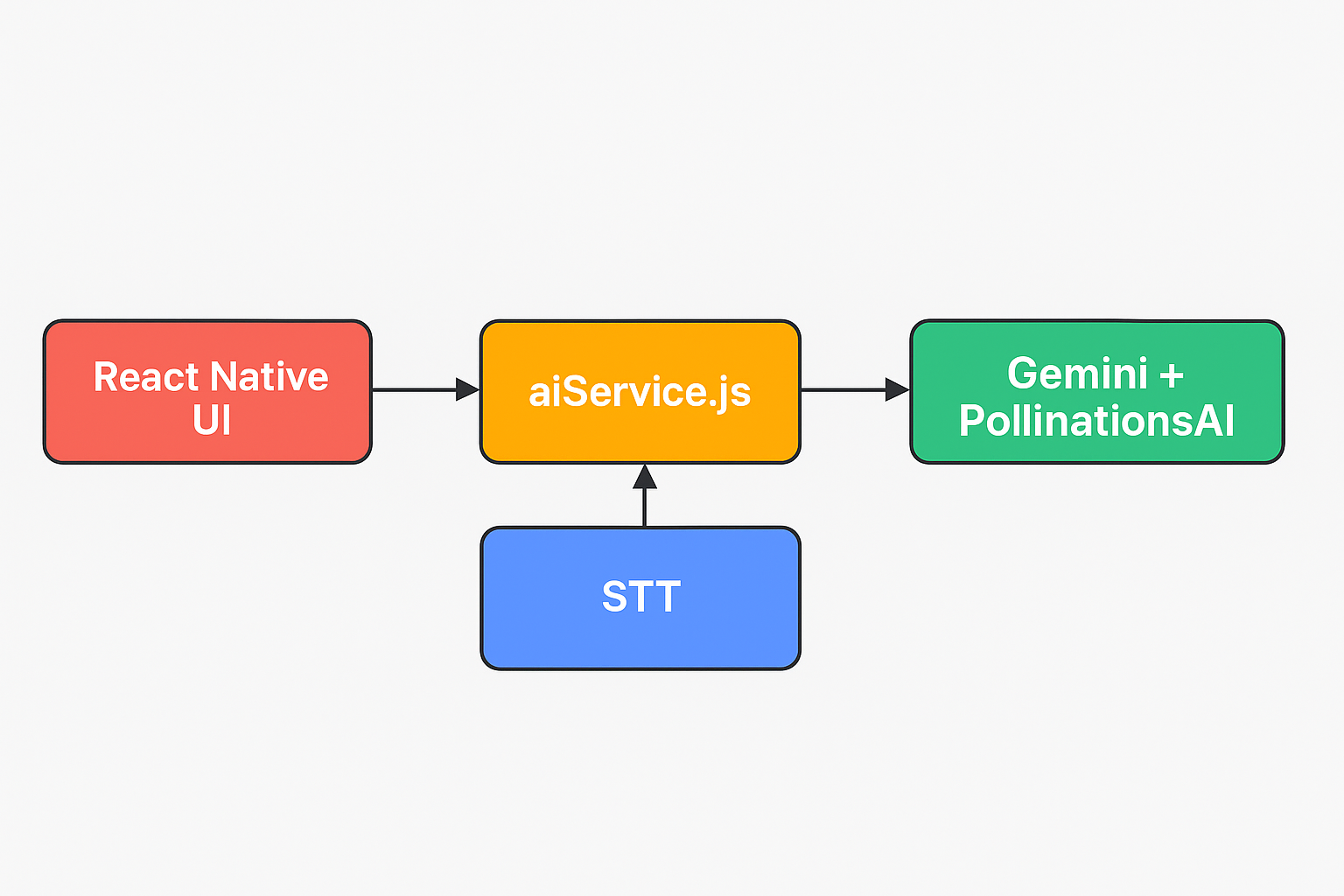
Building this app presented some really interesting puzzles, but solving them was half the fun! The main goal was to connect three distinct layers seamlessly:
Your Voice to Text: Capturing what you say and turning it into text that my app (and the AI) could understand.
AI Intelligence (Gemini): Sending that text to a powerful AI model to get an intelligent, tailored response (or a recipe idea!).
AI Creativity (PollinationAI): Taking text descriptions and generating unique, relevant images.
Speaking the Response: Having the app revert the AI's answer back to you.
To help visualize the flow better, here's a simple architecture diagram:
The Brain of the Operation: Integrating Gemini
At the heart of my app's intelligence is Google's Gemini API. This is where the magic of understanding your queries and generating creative text responses happens. Instead of a traditional backend server, I directly integrated Gemini's capabilities into my React Native app, making it incredibly fast and responsive.
I structured my AI interactions through a dedicated service file, aiService.js. This keeps my AI logic clean and separate from the UI components. It's essentially the bridge between my app and the powerful Gemini model.
Here's a glimpse of how aiService.js handles the communication with Gemini:
// aiService.js
import { GoogleGenerativeAI } from "@google/generative-ai";

const genAI = new GoogleGenerativeAI(process.env.GEMINI_API_KEY);

export async function getGeminiResponse(userInput) {
  const model = genAI.getGenerativeModel({ model: "gemini-pro" });

  const prompt = `You are a creative assistant. The user said: "${userInput}".
  Respond helpfully and creatively, whether they're asking for a recipe, advice, or anything else.`;

  const result = await model.generateContent(prompt);
  const response = await result.response;
  return response.text();
}
As you can see, the getGeminiResponse function takes the user's spoken input (converted to text), crafts a prompt to guide Gemini's behavior (making it a "creative assistant"), and then sends it off. This design allows for flexible interaction — whether you are asking for a recipe, general advice, or anything else, Gemini handles it!
Bringing Ideas to Life: Image Generation with PollinationAI
Beyond text, I wanted my app to visualize the AI's output. This is where PollinationAI stepped in. It's an incredible platform for generating images from text descriptions. After Gemini gives me a recipe idea, I can use a part of that description to ask PollinationAI to create a corresponding image, truly bringing the AI's creativity to life on the screen.
The integration was also handled within a similar service structure, ensuring clean separation of concerns:
// In aiService.js — PollinationAI image generation
export async function generateImage(prompt) {
  const encodedPrompt = encodeURIComponent(prompt);
  const imageUrl = `https://image.pollinations.ai/prompt/${encodedPrompt}`;
  return imageUrl;
}
Note: The PollinationAI snippet above is conceptual — the API details may vary, but it illustrates the core idea.
This allows my app not just to tell you a recipe, but to show you what it might look like, adding a whole new dimension to the user experience!
The User Interface: React Native and Voice Integration
On the frontend, React Native was my go-to choice. It allowed me to build a beautiful, fluid interface that works seamlessly on both iOS and Android. For voice input, React Native's bridge to native modules enabled me to tap into the device's Speech-to-Text (STT) capabilities.
Here's a simplified look at how the voice interaction is triggered in a React Native component:
import Voice from "@react-native-voice/voice";
import { getGeminiResponse } from "./aiService";
import { generateImage } from "./aiService";

Voice.onSpeechResults = async (e) => {
  const spokenText = e.value[0];
  const aiResponse = await getGeminiResponse(spokenText);
  const imageUrl = await generateImage(aiResponse);
  // Update state with aiResponse and imageUrl to display in UI
};

Voice.onSpeechEnd = () => {
  Voice.stop();
};

const startListening = () => {
  Voice.start("en-US");
};
This snippet shows the core flow: the user taps a button, Voice.start() begins listening, onSpeechResults captures the transcript, and onSpeechEnd triggers the call to Gemini and then PollinationAI, with the final AI response displayed on screen.
What I Learned and What You Can Build
Building this app was an incredible learning experience. It showcased how seemingly complex AI interactions can be broken down and built with readily available tools like Gemini, PollinationAI, and the versatile React Native framework.
This isn't just about generating recipes; it's about the power of conversational AI and generative models to:
Create dynamic content: From text to images, AI can now produce unique outputs on demand.
Enhance accessibility: Voice interfaces make apps more intuitive and accessible for everyone.
Boost creativity: AI can act as a co-creator, sparking ideas and bringing them to life visually.
The journey of blending speech, AI intelligence, and creative generation into a cohesive user experience has truly begun. I hope this might be useful for you, and most importantly, you will have the same fun I had building it.
Originally published on GeekyAnts Blog