# Build Customized Spreadsheets Using AG-Grid
## AG-Grid
AG-Grid is a fully dynamic Javascript based data grid, which is compatible with different Javascript frameworks such as **Angular**, **React** and **Vue**. AG Grid comes in two forms: `ag-grid-community` (free for everyone, including production use) and `ag-grid-enterprise` (license required to use).
In this article, we are going to talk about `ag-grid-community` as it is free for everyone and use it with **React**.
## How to install
To install AG-Grid, use the following command:
```
npm install --save ag-grid-community ag-grid-react```
Once it is installed, we can use it as a component or a child component. Just add these import lines when using it in a file:
```
import { AgGridReact } from "ag-grid-react";
import "ag-grid-community/dist/styles/ag-grid.css";
import "ag-grid-community/dist/styles/ag-theme-balham-dark.css";
```
## Why AG-Grid
It is important to clarify why to use this grid, what purpose it solves and where can it be used. In my opinion, a good example would be an experience of mine which drew me to use this plugin to solve a problem.
So, the project I was working on demanded a fully dynamic grid, which takes its data and structure both from the backend, as well as has many functionalities other than the basic sorting and searching.
The project basically demanded a grid, which has:
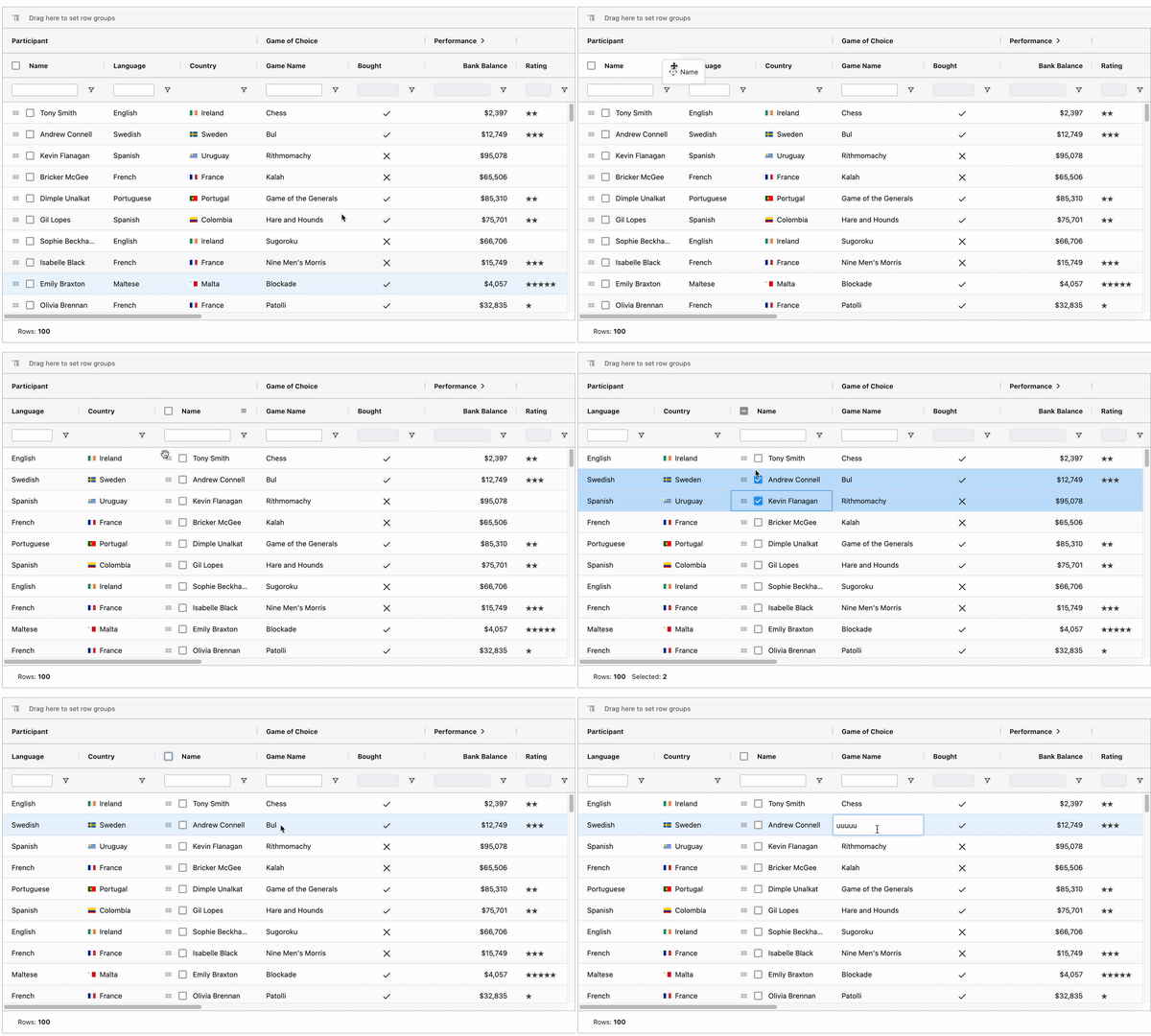
- Rearrangeable columns.
- Selectable rows.
- Editable cells.
- Ability to export the grid as a `.csv` (the feature of allowing the users to download the created grid on their system as a `.csv` file).
- An agile component.
- Customizable Appearance.
- Customizable Cell Contents.
- Keyboard Navigation(customizable cell movement, such as using `tab`).
So, I explored a lot of options (other packages) available for creating grids, but none of them supported all these features as easily as AG-Grid handled it.

Let's walk through the entire application point by point and see how I achieved all the above functionalities using Ag-Grid.
### 1\. Dynamic row data and columns.
The requirement for the grid was as such that the rows and columns were not fixed. In that case, I needed a grid that can take the data for its rows and columns dynamically.
To achieve that, we are using two components here, `AgGridReact` and `AgGridColumn`:
```
```
Here, `rowData` prop takes an array of objects. You can get the `rowData` from the backend and use it in the grid. Similarly, for defining the columns of the grid, there is a prop named `columnDefs`.
```
```
Where `columnDefs` can be as follows:
```
columnDefs: [
{
headerName: 'Athlete',
field: 'athlete'
},
{
headerName: 'Sport',
field: 'sport',
},
{
headerName: 'Age',
field: 'age',
type: 'numberColumn'
},
{
headerName: 'Year',
field: 'year',
type: 'numberColumn'
},
{
headerName: 'Date',
field: 'date',
width: 220#
}
]```
Where `headerName` defines the Headinh that has to be displayed on a column, and `field` acts as a unique key. There are many more properties that can be added to this `columnDefs`.
### 2\. Rearrangeable Columns
The other complex requirement was to add the feature of dragging and rearranging the columns of the grid on different gestures.

The columns in Ag Grid are, by default, **draggable** and we can switch the places of columns simply by dragging and dropping it, but apart from this gesture based rearrangement, there is also the option of controlled rearrangement of columns using the `gridColumnApi`.
```
import React from "react";
import { AgGridReact } from "ag-grid-react";
import "ag-grid-community/dist/styles/ag-grid.css";
import "ag-grid-community/dist/styles/ag-theme-balham-dark.css";
import { AllCommunityModules } from "@ag-grid-community/all- modules";
class Grid extends React.Component {
constructor(props) {
super(props);
this.state = {
modules: AllCommunityModules,
rows: [{}, {}, {}],
columnDefs: [{
field: 'athlete',
suppressMovable: true,
width: 150,
cellClass: 'suppress-movable-col'
},
{
field: 'age',
lockPosition: true,
cellClass: 'locked-col',
},
{
field: 'country',
width: 150,
}]
gridApi: "",
gridColumnApi: "",
};
}
onGridReady = (params: GridReadyEvent) => {
this.setState({
gridApi: params.api,
gridColumnApi: params.columnApi
});
};
onCountryFirst = () => {
this.gridColumnApi.moveColumn('country', 0);
};
render() {
return (
);
}
}
export default Grid;
```
In the example above:
- We have used `gridColumnApi`'s `moveColumn` function to rearrange the column
position. Similarly there are many other functions too.
- `GridApi` and `gridColumnApi` are the main elements as all the methods belong to these two APIs and we can access any method using them.
- Here is a list of [methods](https://www.ag-grid.com/documentation/react/grid-api/) that are offered by `GridApi`;
- ...and the list of [methods](https://www.ag-grid.com/documentation/react/column-api/) that are offered by `GridColumnApi`.
### 3\. Selectable Rows
Row selection is a very common requirement for a grid in order to perform some operation on multiple rows at a time.

In order to make the rows of a grid selectable, we just need to add a prop in Ag Grid, that is:
```
rowSelection={"multiple"} / {"single"}
```
...and for accessing the selected rows, once selection have been done, we use `gridApi`.
```
onSelectionChanged = () => {
var selectedRows = this.state.gridApi.getSelectedRows();
};
this.onSelectionChanged()}
>
```
### 4\. Editable Cells
The other complex requirement was to make some of the cells of the grid editable based on some product related conditions.
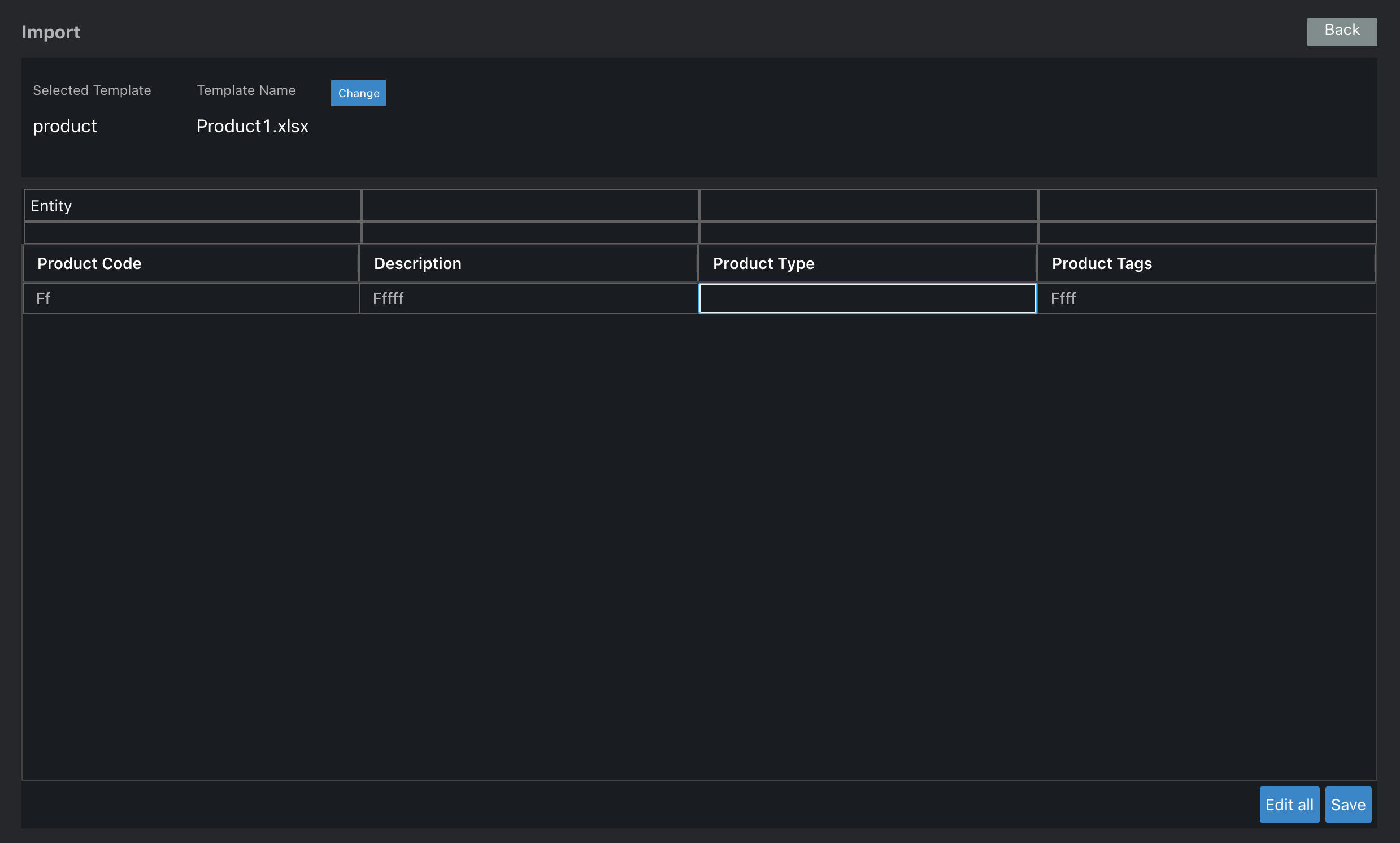
The simplest way to make all the cells editable in gird is by adding the `editable` prop as true in the `defaultColDef`.
```
defaultColDef: {
editable: true,
}
this.onSelectionChanged()}
defaultColDef={this.state.defaultColDef}
>
```
Other than that, there are many more advanced ways in which this grid handles cell editing. For those detailed examples, this [link](https://www.ag-grid.com/documentation/react/cell-editing/#top) can help.
### 5\. Export the grid as `.csv`
The product demanded the feature using which, the users can download the grid as a `.csv` file.
For downloading the grid content as a `.csv`, `gridApi`'s `exportDataAsCsv` method is used:
```
onDownload = () => {
const params = this.getParams();
this.state.gridApi.exportDataAsCsv(params);
};
getParams = () => {
return {
customHeader: this.state.header,
fileName: "your_filename"
};
}
```
Here `params` can be customised according to how you want to export specific data as a `.csv`. For a more detailed explanation refer to this [link](https://www.ag-grid.com/documentation/react/export/).
## Conclusion
Ag-Grid is a powerful plugin that gives you immense control over your grids and how you want to handle them. With these examples and applications, I hope I was able to demonstrate how efficient and easy Ag-Grid can be. Try it out and let me know in the comments how you like it.
Thanks for reading!