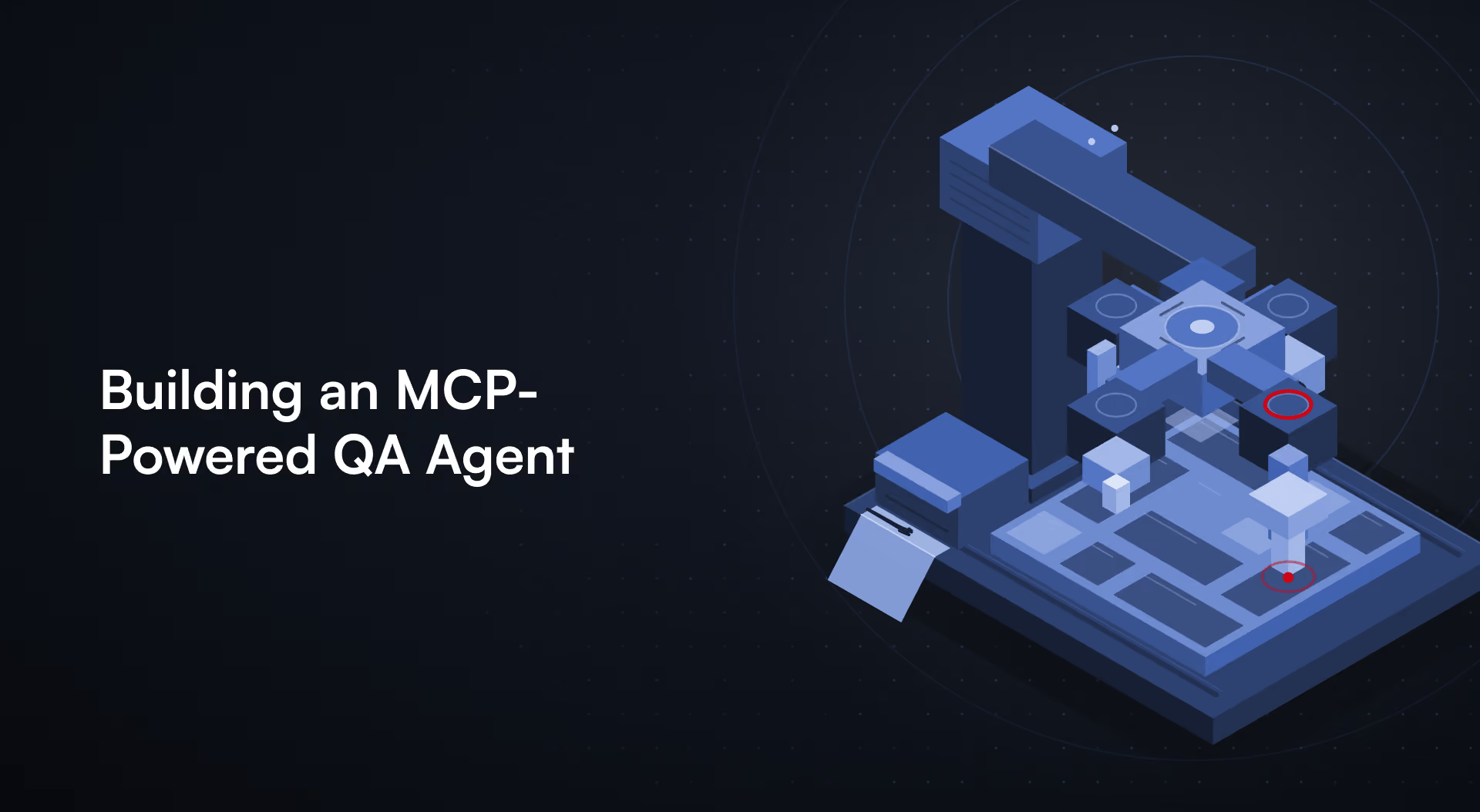
Connecting AI to Playwright, APIs, test evidence, and CI/CD.
Abstract
AI-assisted software testing is moving beyond code generation toward agents that can inspect applications, execute tests, analyze failures, and interact with engineering tools. Model Context Protocol (MCP) provides a standardized interface for AI applications to discover and invoke tools exposed by external systems. The current MCP TypeScript SDK v2 exposes tools, resources, and prompts.
This article presents a code-first QA architecture using TypeScript, Playwright, Zod, structured outputs, permission boundaries, evidence collection, and human approval. The objective is controlled access to deterministic QA capabilities rather than unrestricted autonomy.
Introduction
A modern QA workflow spans browser automation, API validation, logs, traces, test reports, test data, source control, and CI/CD. An AI model can reason across these systems, but reasoning alone does not give it safe or structured access to them.
MCP provides a standardized protocol boundary between an AI host and external tools and data. The engineering challenge is therefore not simply connecting MCP to Playwright; it is designing a QA tool layer with explicit capabilities, validated inputs, controlled environments, observable outputs, and safe failure behavior.
This article focuses on a practical architecture: an MCP server exposes selected QA operations while Playwright and API clients remain the deterministic execution layer. The AI can request an operation, but the server owns validation and authorization.
Architecture
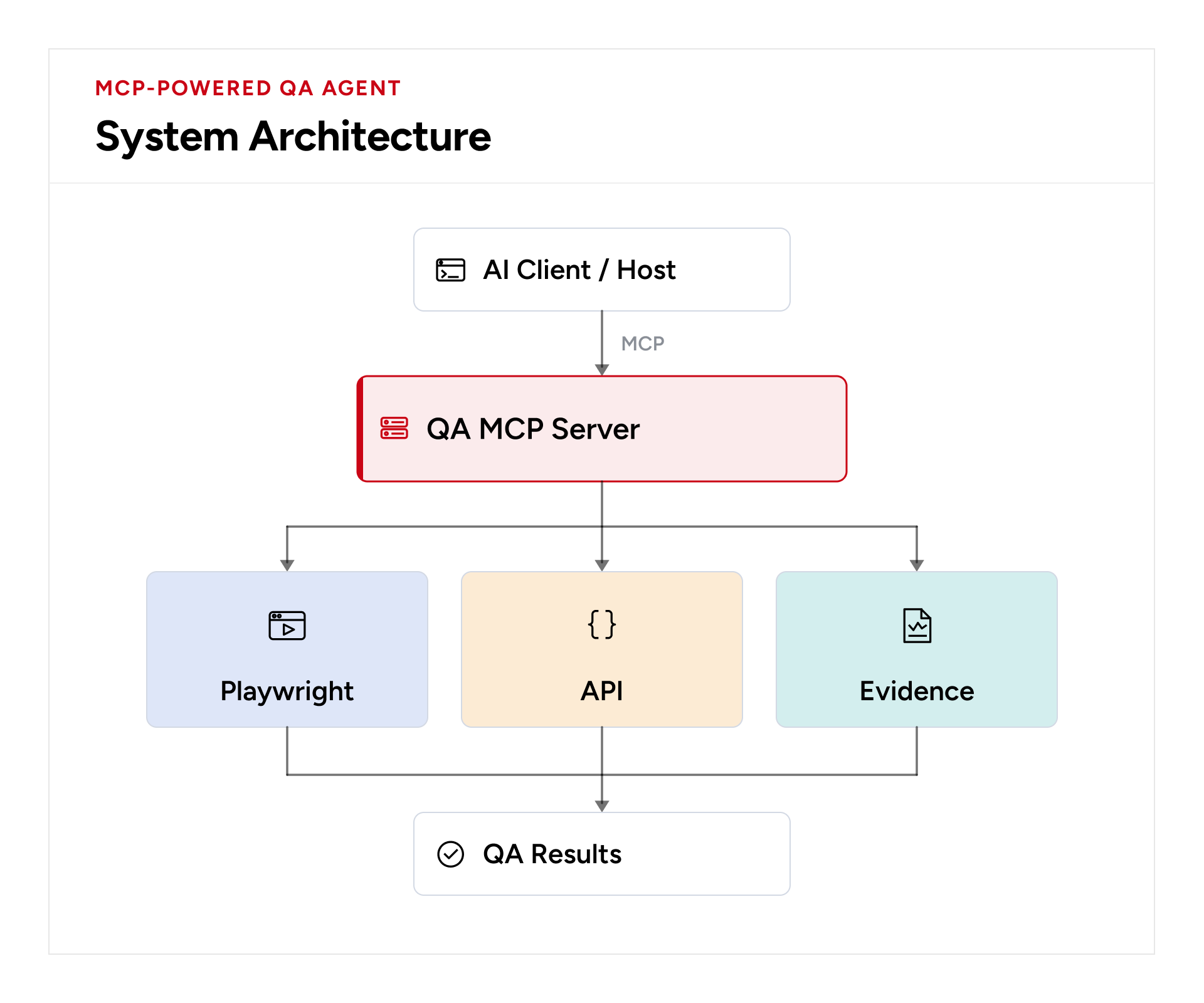
The MCP TypeScript SDK supports servers exposing tools, resources, and prompts. Tools are appropriate for actions and side effects; resources are appropriate for read-oriented data such as reports or configuration.
The SDK also supports stdio and Streamable HTTP transports. See the official MCP SDK documentation for the current v2 implementation.
Project Structure
qa-mcp-agent/
├── src/
│   ├── server.ts
│   ├── tools/
│   │   ├── playwright.ts
│   │   ├── api.ts
│   │   └── evidence.ts
│   ├── security/
│   │   └── permissions.ts
│   └── utils/
│       └── sanitize.ts
├── tests/
│   └── checkout.spec.ts
├── artifacts/
├── package.json
└── tsconfig.json
Creating the MCP Server
For a current TypeScript implementation, use the v2 server package and Zod for input validation.
npm init -y
npm install @modelcontextprotocol/server zod @playwright/test
import { McpServer } from "@modelcontextprotocol/server";

const server = new McpServer({
  name: "qa-mcp-server",
  version: "1.0.0"
});
The current v2 SDK documents @modelcontextprotocol/server as the server package and uses Zod schemas for typed validation.
Expose a Controlled Playwright Tool
import * as z from "zod/v4";

server.registerTool(
  "run_playwright_test",
  {
    title: "Run Playwright Test",
    description: "Execute an approved Playwright test file",
    inputSchema: { testFile: z.string() },
    outputSchema: {
      passed: z.boolean(),
      output: z.string()
    }
  },
  async ({ testFile }) => {
    validateTestFile(testFile);
    const result = await runPlaywrightTest(testFile);
    const output = { passed: result.passed, output: result.output };
    return {
      content: [{ type: "text", text: JSON.stringify(output) }],
      structuredContent: output
    };
  }
);
MCP tool schemas validate arguments before the handler executes, and structured outputs can be validated against an output schema. Clients can discover tools with listTools and invoke them with callTool.
Keep Playwright Deterministic
import { execFile } from "node:child_process";

function runPlaywrightTest(testFile: string) {
  return new Promise<{ passed: boolean; output: string }>((resolve) => {
    execFile(
      "npx",
      ["playwright", "test", testFile],
      { timeout: 120000 },
      (error, stdout, stderr) => {
        resolve({
          passed: !error,
          output: `${stdout}\n${stderr}`
        });
      }
    );
  });
}
The server should not pass arbitrary shell strings from the model into an operating-system shell. Use an allowlist and validated arguments.
Permission Boundaries
const ALLOWED_TESTS = new Set([
  "tests/login.spec.ts",
  "tests/checkout.spec.ts",
  "tests/cart.spec.ts"
]);

function validateTestFile(testFile: string) {
  if (!ALLOWED_TESTS.has(testFile)) {
    throw new Error(`Test file is not approved: ${testFile}`);
  }
}
The security boundary belongs in deterministic application code, not in the model prompt.
API Testing as Another Tool
server.registerTool(
  "validate_api",
  {
    title: "Validate API",
    description: "Send an HTTP request and validate the response",
    inputSchema: {
      method: z.enum(["GET", "POST", "PUT", "DELETE"]),
      url: z.string(),
      expectedStatus: z.number()
    }
  },
  async ({ method, url, expectedStatus }) => {
    const response = await fetch(url, { method });
    const output = {
      status: response.status,
      passed: response.status === expectedStatus
    };
    return {
      content: [{ type: "text", text: JSON.stringify(output) }],
      structuredContent: output
    };
  }
);
In production, URL allowlists, authentication handling, request-body validation, rate limits, and environment restrictions should be added before exposing mutation-capable API tools.
Use Resources for Test Evidence
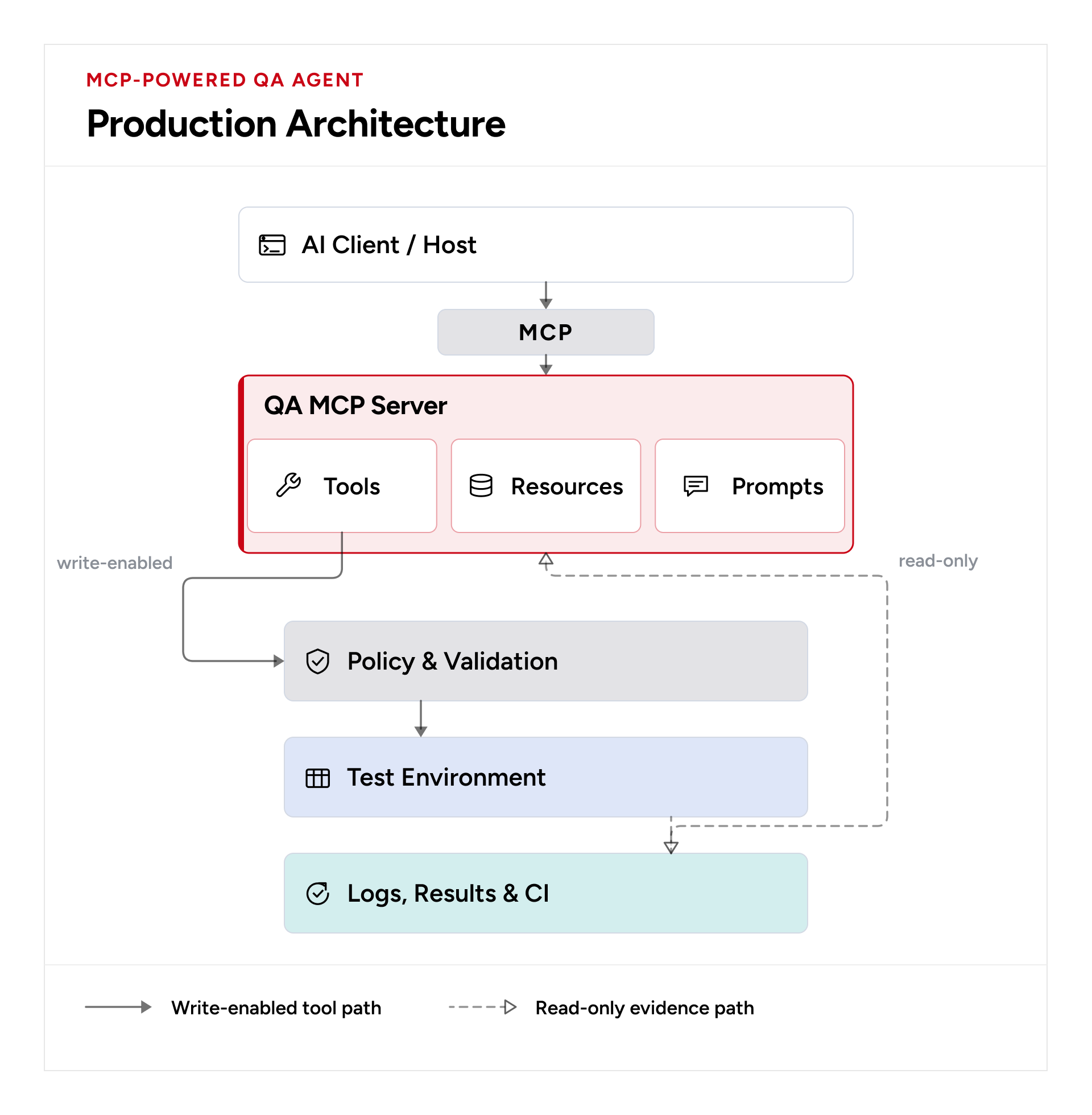
MCP resources are a better fit for read-oriented evidence than action tools. A QA server can expose resources such as test-results://latest or trace://checkout.
server.registerResource(
  "latest-results",
  "test-results://latest",
  { title: "Latest Playwright Results", mimeType: "application/json" },
  async (uri) => {
    const results = await readLatestResults();
    return {
      contents: [{
        uri: uri.href,
        mimeType: "application/json",
        text: JSON.stringify(results)
      }]
    };
  }
);
Failure Analysis
server.registerTool(
  "analyze_test_failure",
  {
    title: "Analyze Test Failure",
    inputSchema: {
      testName: z.string(),
      error: z.string(),
      consoleErrors: z.array(z.string()),
      networkFailures: z.array(z.string())
    },
    outputSchema: {
      classification: z.enum([
        "APPLICATION", "TEST", "NETWORK",
        "DATA", "ENVIRONMENT", "UNKNOWN"
      ]),
      evidence: z.array(z.string())
    }
  },
  async (input) => {
    const result = await analyzeFailure(input);
    return {
      content: [{ type: "text", text: JSON.stringify(result) }],
      structuredContent: result
    };
  }
);
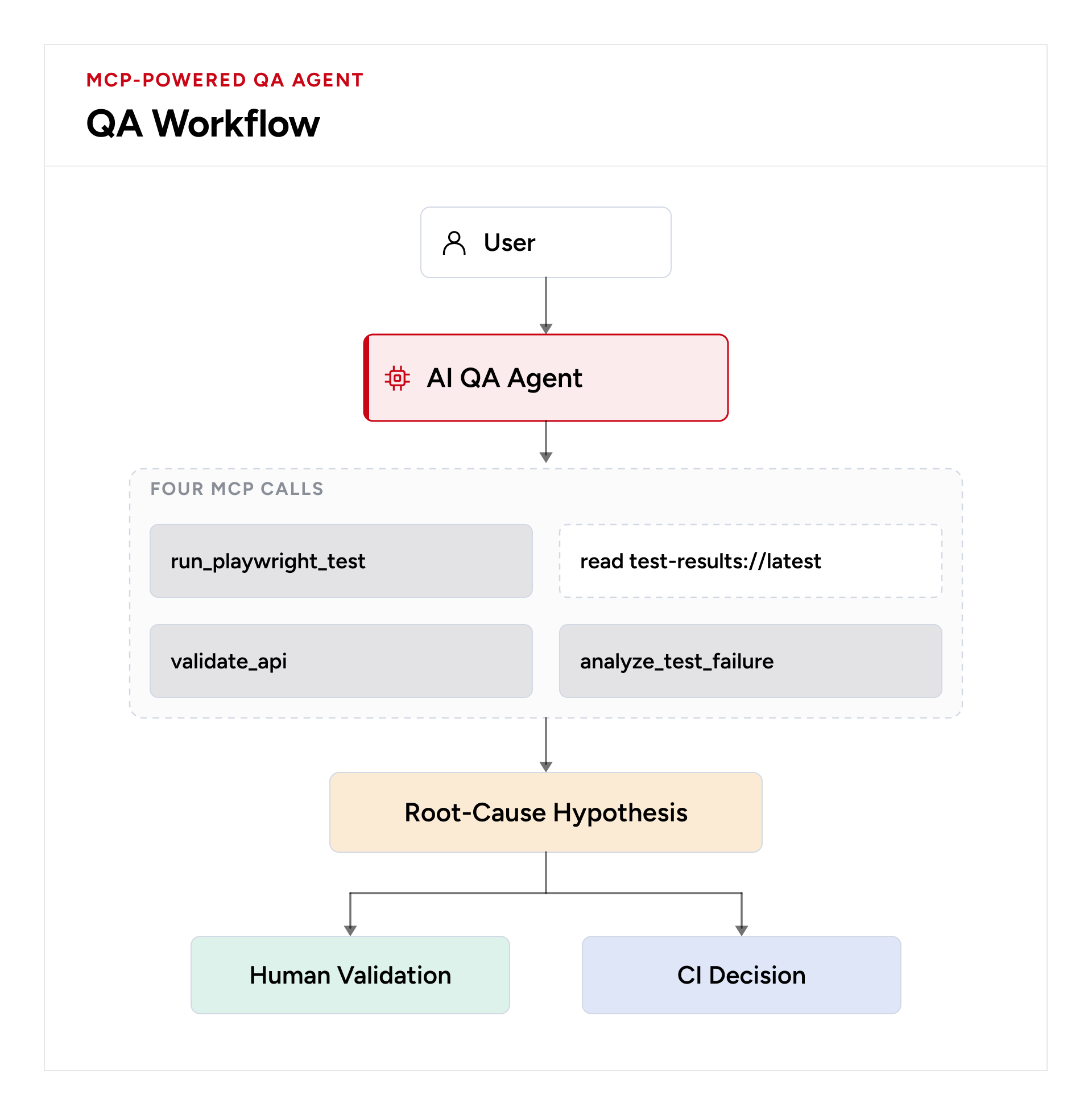
Separate observed evidence from AI-generated hypotheses. The AI can classify a failure and recommend an investigation path, but the underlying evidence should remain inspectable.
The UNKNOWN State
type Diagnosis =
  | "APPLICATION" | "TEST" | "NETWORK"
  | "DATA" | "ENVIRONMENT" | "UNKNOWN";

const analysisInstruction = `
Analyze only the supplied evidence.
Do not invent missing information.
If evidence is insufficient, return UNKNOWN.
Separate observed evidence from hypotheses.
`;
Allowing UNKNOWN is an important reliability control. It prevents incomplete logs from being converted into false certainty.
A QA Workflow
Human Approval for High-Risk Operations
type RiskLevel = "LOW" | "MEDIUM" | "HIGH" | "CRITICAL";

const TOOL_RISK: Record<string, RiskLevel> = {
  read_test_results: "LOW",
  run_playwright_test: "LOW",
  validate_api: "LOW",
  create_test_data: "MEDIUM",
  modify_test: "HIGH",
  delete_test_data: "CRITICAL"
};

function requiresApproval(risk: RiskLevel) {
  return risk === "HIGH" || risk === "CRITICAL";
}
The AI can request an action, but the policy layer determines whether it is permitted. Human approval is an explicit control point rather than a suggestion embedded in a prompt.
Auditability
interface AuditEvent {
  timestamp: string;
  agent: string;
  tool: string;
  arguments: unknown;
  environment: string;
  decision: "ALLOWED" | "BLOCKED" | "APPROVAL_REQUIRED";
  approvedBy?: string;
}
Every tool invocation should produce an auditable event so teams can determine which agent called which tool, against which environment, and with what authorization decision.
Connecting the Client
const { tools } = await client.listTools();

const result = await client.callTool({
  name: "run_playwright_test",
  arguments: {
    testFile: "tests/checkout.spec.ts"
  }
});
The MCP client API supports discovery and invocation of tools and access to resources. Playwright also provides an MCP server for browser automation, which can be used when the use case is direct browser interaction.
Testing the MCP Server
test("blocks unapproved test", async () => {
  await expect(
    runPlaywrightTest("tests/../../secret.spec.ts")
  ).rejects.toThrow("Test file is not approved");
});

test("requires approval for data deletion", async () => {
  const decision = authorize({
    tool: "delete_test_data",
    environment: "production"
  });
  expect(decision).toBe("BLOCKED");
});
The MCP server itself is production software. Its schemas, authorization rules, environment restrictions, error handling, and tool contracts should therefore be covered by automated tests.
Evaluation: Avoid Unsupported Benchmark Claims
A strong implementation should be evaluated rather than supported by invented numbers. Compare conventional QA with MCP-assisted QA using the same scenarios and report the actual environment and measurement method.
| Metric | Measurement |
|---|---|
| Execution time | Repeated wall-clock runs |
| Diagnosis time | Failure to actionable hypothesis |
| Correct classification | Correct diagnoses / total failures |
| Human interventions | Manual approvals or interventions |
| Blocked unsafe actions | Policy violations prevented |
| Tool-call failures | Invalid or failed calls |
| Cost | LLM/tool/API cost per workflow |
If numerical performance results are reported, include the actual MCP/Node/Playwright versions, machine or CI environment, workload, number of runs, warm-up method, and measurement definition. Do not present illustrative figures as measured evidence.
Production Architecture
Trade-offs
More tools increase capability but also increase the action space the model must select from. More autonomy can reduce manual effort but increases the impact of incorrect decisions. More evidence can improve diagnosis but can increase data exposure and model cost. More guardrails improve safety but can introduce friction for unusual workflows.
The engineering objective is therefore not maximum autonomy. It is useful autonomy within an explicitly defined risk boundary.
Conclusion
MCP gives QA engineers a standardized way to expose testing capabilities to AI systems, but the protocol itself does not define a safe QA architecture. That responsibility belongs to the implementation.
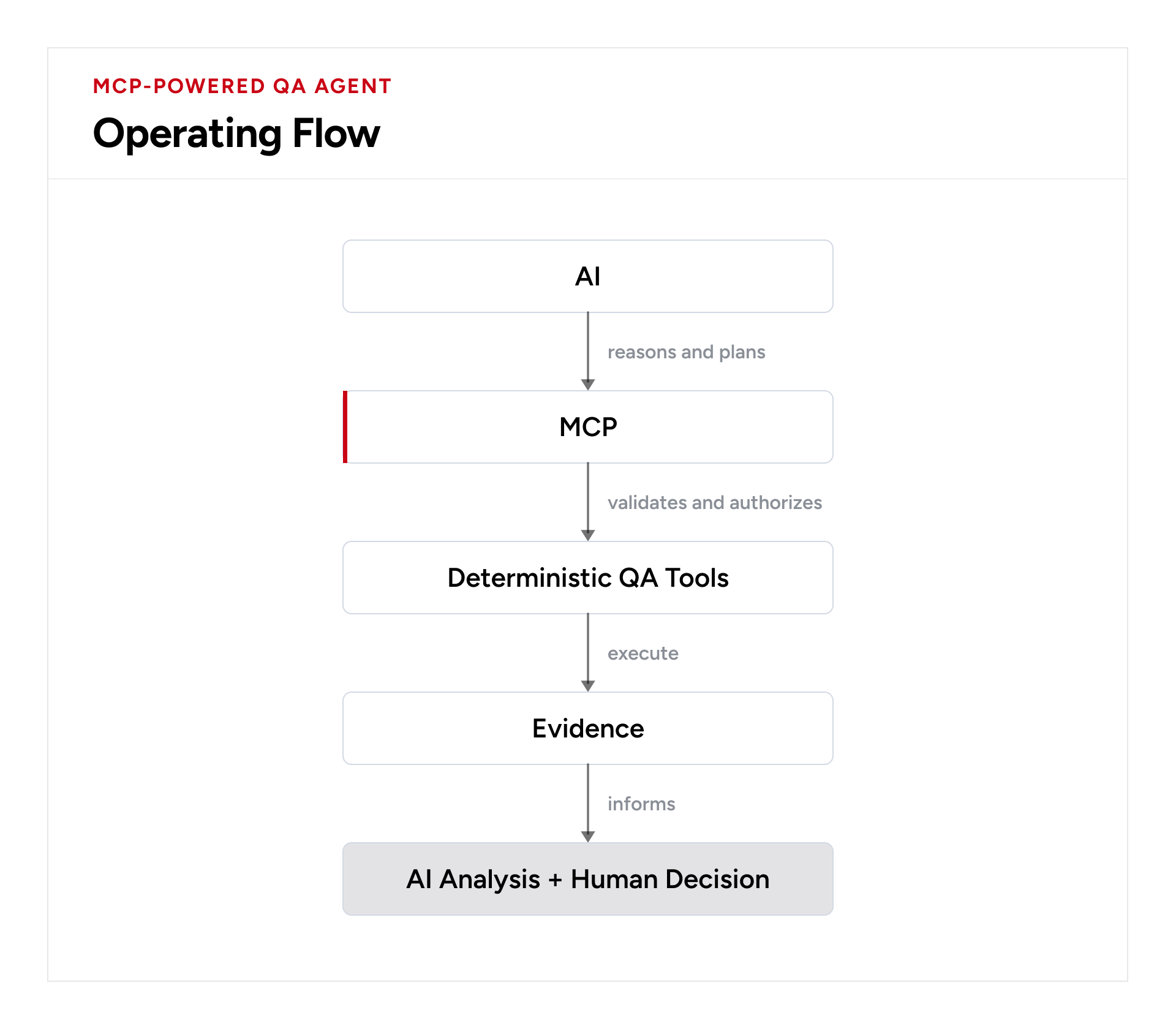
A production-oriented QA MCP server should expose narrow, validated capabilities; keep browser and API execution deterministic; separate tools from read-only evidence; enforce environment and permission boundaries outside the model; require human approval for high-impact actions; and record enough evidence to make agent behavior auditable.
The important shift is from “AI controls the test environment” to “AI operates through a controlled QA interface.” That distinction provides the foundation for building AI-assisted testing systems that remain useful, observable, and governable as their autonomy increases.
References
MCP TypeScript SDK v2 documentation; MCP client tool/resource APIs; MCP resources and tools documentation; Playwright MCP documentation. These are the current primary technical references used for the implementation.
Comments
Join the discussionNo comments yet. Be the first to comment.