Feature Flags as Technical Debt: The Cleanup Nobody Schedules
This blog explains how unmanaged feature flags create technical debt and how teams can detect, manage, and remove them safely.
Feature flags are one of the cheapest tools in engineering to adopt and one of the most expensive to leave unmanaged. Teams use them for gradual rollouts, A/B tests, kill switches, and gating unfinished work, but few teams have a matching process for removing them once they have served their purpose. As a result, flags that were meant to be temporary become permanent, adding unnecessary complexity to the codebase.
This article explains why flag cleanup gets skipped and why it creates a real engineering cost. It also walks through a staleness-detection implementation, a flag-removal exercise, and a practical checklist for managing flags across their full lifecycle, from creation to removal.
Why Flags Are Easy to Add and Hard to Remove
Adding a flag is a small, fast PR. Wrapping a block of code in a conditional and wiring it to a config value takes minutes, and it ships in the same PR as the feature it gates — there's no separate approval step, no extra review, no reason for anyone to push back. Removing a flag involves a different kind of work. You have to find every place it is checked, including references in logging, analytics, and monitoring code, confirm which branch is now permanently "on" or "off," delete the dead branch, update or delete the tests that covered it, and verify that nothing downstream depends on the old behavior. This multi-step effort competes with new feature work for the same sprint capacity, so cleanup often gets pushed to a later sprint until the flag becomes a permanent part of the codebase.
There's also a confidence problem. Once a flag has been live for months, the person who added it may have moved teams, changed roles, or forgotten why it was added. Removing the conditional can feel risky when its dependencies are unclear, so teams may leave it in place. That decision can turn a two-week release flag into a permanent part of the codebase.
Underneath both of these is a structural gap: a flag rarely comes with a ticket, an expiry date, or a named owner responsible for its removal. By default, creating a flag does not create a corresponding task to revisit it later. Without documented future work, the flag can remain in place. Meanwhile, teams add new flags every sprint while removing few of the old ones, so the backlog grows and cleanup becomes more complex as additional flags enter the same code paths.
The Flag Lifecycle
The diagram below lays out the full path a flag should take, from creation to retirement. The critical fork sits in the middle of the diagram: once a flag reaches "stable at 100%," it either gets caught by an automated staleness check and routed to a removal PR, or it gets ignored and drifts into permanent technical debt. Most flags fail at exactly this point — not because removal is technically difficult, but because nothing in the default engineering workflow forces the question to be asked. Without an automated trigger, a flag can sit at "stable" for years with nobody ever explicitly deciding to leave it that way; it simply never comes up.
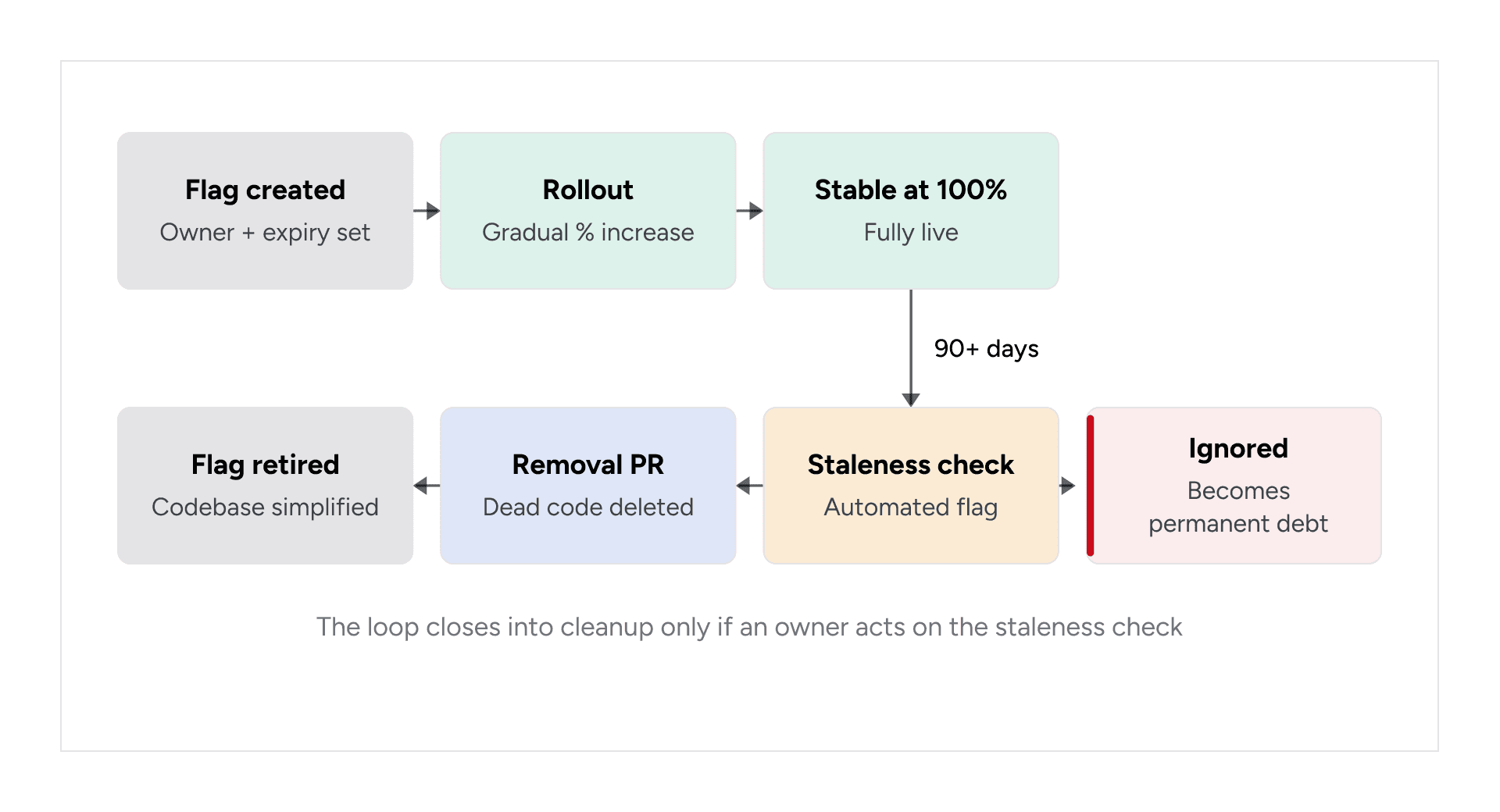
Figure 1: The feature flag lifecycle, from creation through rollout to either scheduled removal or stale limbo.
Why This Is a Real Cost, Not Just Clutter
Each independent binary flag can double the number of possible runtime states. A function gated by three independent flags can have up to eight possible states, but teams may have designed or tested only a subset of those combinations. The remaining states can introduce interactions that were not considered during development or testing.
Stale flags can create bugs through untested interactions. Two flags that are each considered "basically always on" can still interact in a combination the team did not anticipate. If the team assumes that only one meaningful state is live, that interaction may not be covered during testing or code review and can surface only under production traffic.
New engineers may avoid code affected by unfamiliar flags. When it is unclear which flags are critical and which can be removed, team members may work around that code rather than risk breaking an unknown dependency. This can slow down simple changes and introduce workarounds that add further complexity.
The number of dependencies can grow the longer a flag remains in place. Flag checks can extend into related systems, including analytics events tied to flag state, log lines that reference the flag, monitoring dashboards built around it, and configurations in other services. As these dependencies accumulate, removing the flag can require changes across several parts of the system.
Not All Flags Are the Same
A major reason cleanup gets mishandled is that teams treat every flag the same, even though the appropriate lifespan depends on why the flag exists. Classifying a flag at creation establishes its expected lifespan and removal requirements before the original context is lost.
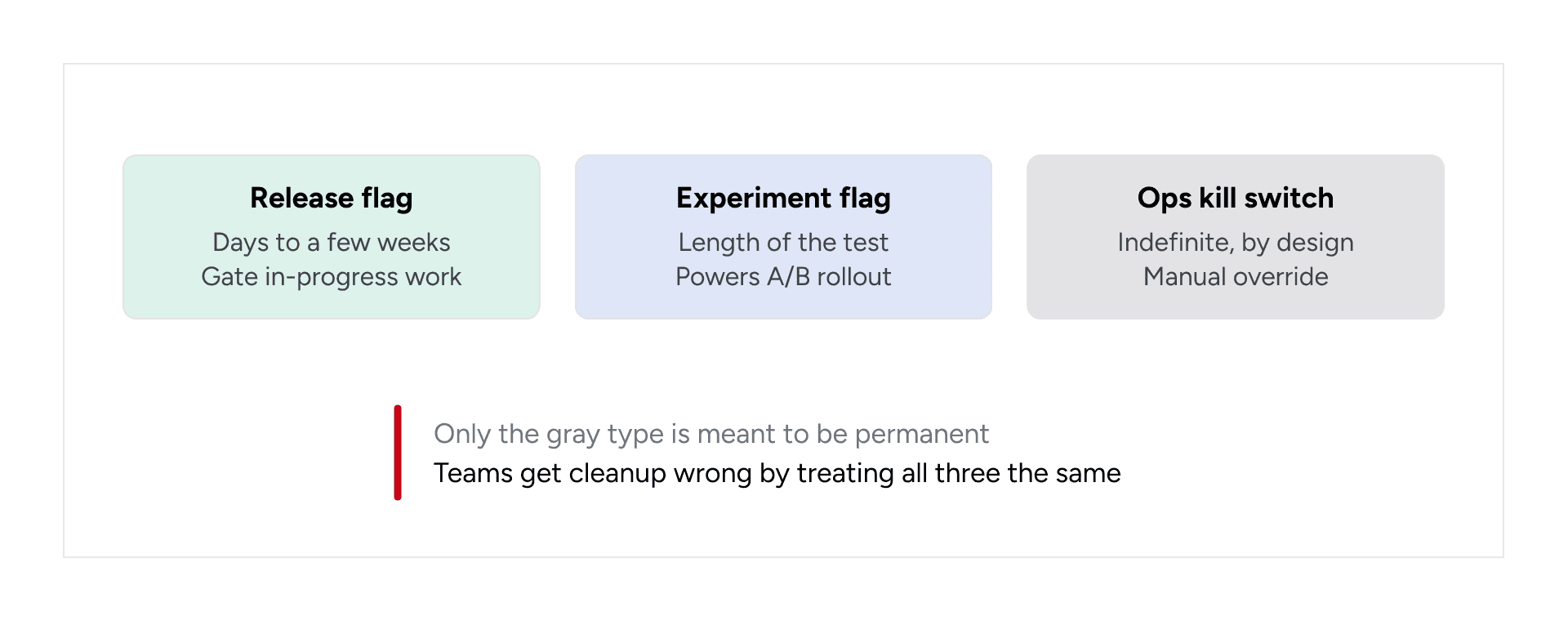
A release flag usually lasts from a few days to a few weeks and is used to gate an in-progress feature during development and rollout. Its cleanup urgency is high, so it should be removed once the feature has reached 100% rollout and the release has stabilized. An experiment flag typically remains active only for the duration of a test, such as an A/B experiment or a gradual, data-driven rollout. Its cleanup urgency is also high, and it should be removed as soon as the experiment concludes, regardless of the outcome. An ops or kill-switch flag, by contrast, is designed to remain in place indefinitely. It acts as a manual override for risky dependencies or emergency controls, so it does not need immediate removal. Instead, it should be reviewed periodically to confirm that it is still necessary and working as intended.
This highlights a common cleanup problem: a release or experiment flag with a short intended lifespan can receive the same caution as an ops kill switch designed to remain in place. That mismatch can turn a two-week flag into a permanent one.
Building the Staleness Detector
The checklist below recommends automating staleness detection, so it helps to show what that implementation looks like. The following example presents the core logic, simplified for readability. In practice, it receives data from the flag provider in use, such as LaunchDarkly, Unleash, or a homegrown configuration table, with each flag providing a rollout percentage, type, and the length of time its state has remained unchanged.
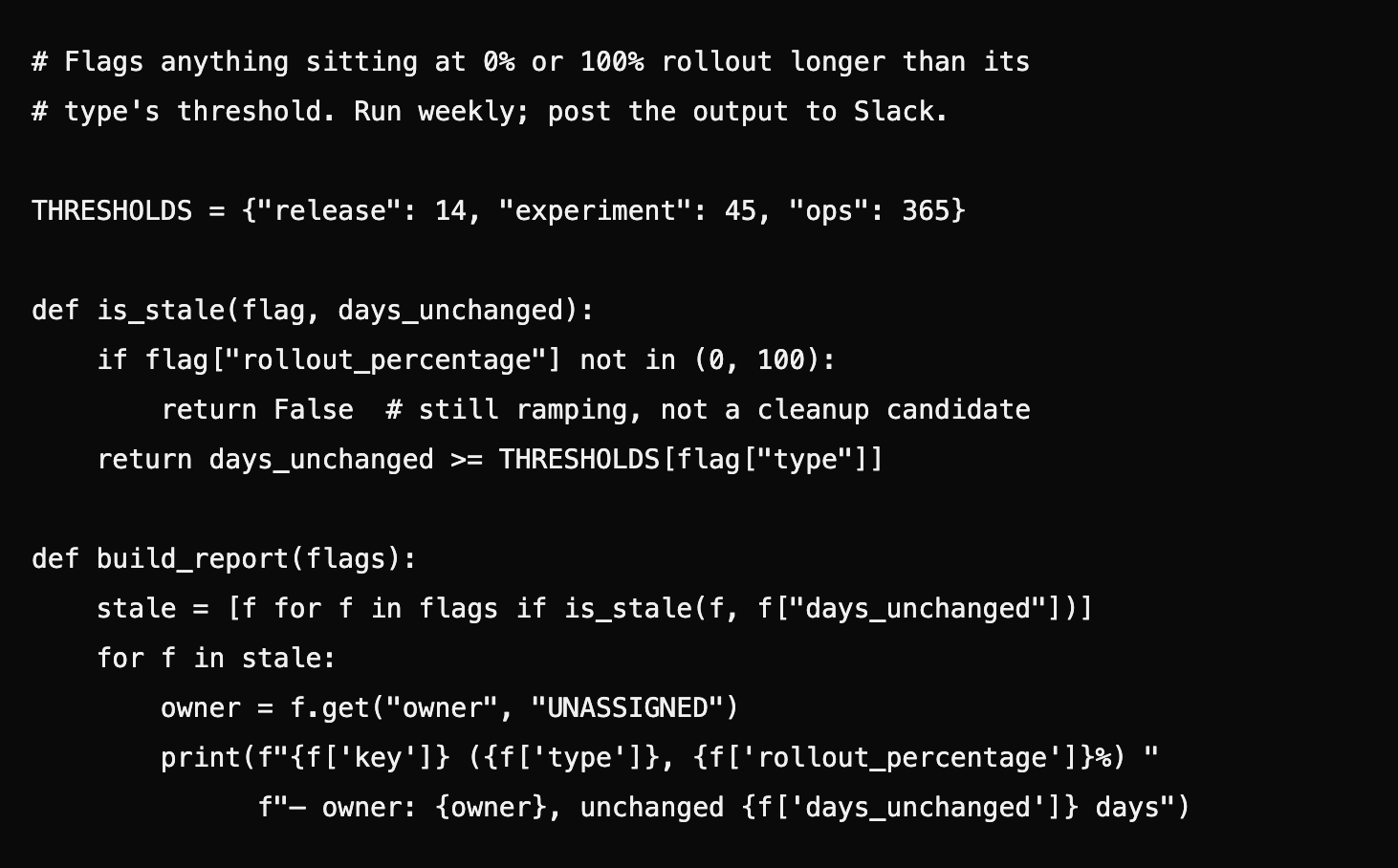
Two design choices here matter more than the code itself:
Thresholds are per-type, not global. A single "flag unchanged for 90 days" rule either fires constantly on ops flags that are correctly untouched, or lets release flags rot for far too long. Splitting the threshold by type — pulled directly from the classification the team should already be doing at creation — makes the report something people trust instead of something they learn to ignore.
The report identifies UNASSIGNED owners. An unowned stale flag has no person or team responsible for acting on the report, which can leave it in the codebase without a clear path to removal. Surfacing that ownership gap instead of defaulting to "team lead" makes responsibility for cleanup visible.
Wiring this into a weekly Slack post or a lightweight internal dashboard, including a spreadsheet as a starting point, turns staleness into something the team reviews on a fixed cadence rather than discovers during an unrelated investigation.
Removing a Stale Flag: A Worked Example
Detection is only half the problem. Deleting a flag safely requires a defined procedure because missed dependencies can create production issues. The sequence below shows how to remove a release flag that has remained at 100% for several weeks, using a checkout-discount flag as an example.
Confirm the resolved state, not just the current one. Check the flag's rollout history, not just its current value — a flag sitting at 100% today that was flipped back to 0% twice in the last month is not actually stable, regardless of what the staleness report says this week.
Search for every reference, not just the obvious one. A project-wide search for the flag's key (checkout_discount_v2) can reveal references beyond the if branch in the checkout service, including a log line that prints the flag's value, an analytics event property, and a conditional in a monitoring dashboard's alert query. All of these references need to be accounted for so the cleanup does not leave dead references behind.
Delete the dead branch, not just the flag check. Before removal, the code checks the flag and branches between apply_discount_v2(cart) and apply_discount_legacy(cart). After removal, it calls apply_discount_v2(cart) directly, with both the flag check and the unused branch removed. Leaving both branches as dead code "just in case" preserves unnecessary code outside the flag inventory. If apply_discount_legacy has no other callers, remove it as well.
Remove the tests for the dead branch, not just add tests for the surviving one. The legacy-path test coverage is now testing code that no longer exists in any reachable state; leaving it in the suite either silently rots (mocking a function that's been deleted) or keeps a maintenance burden alive for behavior nobody can trigger anymore.
Ship it as its own PR, reviewed as a deletion. Bundling flag removal into an unrelated feature PR can reduce the attention given to the search results from step 2. A standalone "remove checkout_discount_v2" PR keeps the review focused on deletion. Any addition in that diff warrants additional review. This procedure is often undocumented, which can make cleanup PRs feel riskier than they are.
When Cleanup Doesn't Happen: A Technical Walkthrough
The scenario below illustrates a failure pattern common enough that most teams running flags at any scale will recognize a version of it, even if the specifics differ. A team adds checkout_discount_v2 to gate a new checkout flow. The rollout succeeds within two weeks and reaches 100% — by every functional measure, the flag has done its job. But it stays in the code for over a year, because removal was never written into any ticket and nobody was assigned to come back to it.
Months later, a second flag, checkout_pricing_experiment, is added to the same checkout path for an unrelated pricing test. It runs after the discount flag: it takes whatever total the discount logic produced and applies an experimental pricing adjustment on top. Individually, each flag was tested and behaved correctly. However, apply_experimental_pricing was written and reviewed under the assumption that total came from apply_discount_legacy. By that point, checkout_discount_v2 had remained at 100% long enough that engineers working on the checkout path no longer considered it a meaningful variable, even though it remained in the code and continued to execute.
apply_discount_v2 returned a total that had already been floored to two decimal places; apply_discount_legacy had not. apply_experimental_pricing applied a percentage multiplier and then rounded. This worked with apply_discount_legacy's unrounded output but could produce an off-by-one-cent total with apply_discount_v2's pre-rounded output for a narrow set of cart values. This type of bug can escape testing when no test covers the combination of two flags operating on the same code path. The fix required a two-line change to apply rounding consistently in one place. The greater cost came from the bug reaching production and requiring someone to identify a cent-level discrepancy in reconciliation data and trace it through a code path that was not expected to contain two active flags. This is the pattern the checklist below is designed to prevent: the gradual accumulation of untracked complexity that can lead to production issues.
Build vs. Buy: Tooling Trade-offs
Teams generally use one of three approaches for flag management, and the right choice depends less on team size than on how comfortable the organization is with an external SaaS dependency in the request path.
A managed feature flag platform, such as LaunchDarkly, provides rich targeting rules, built-in audit logs and change history, and features for identifying stale flags or monitoring usage with relatively little setup. The tradeoff is recurring cost, which can increase with seats or monthly active users. It also introduces another network dependency into the request path, and while the platform may identify stale flags, someone still needs to own and act on that cleanup.
An open-source, self-hosted platform, such as Unleash, avoids per-seat licensing costs and gives teams greater control over data residency and customization. However, the engineering team becomes responsible for operating the flag service, including uptime, upgrades, maintenance, and scaling. These platforms may also provide fewer built-in insights than managed alternatives unless additional monitoring and reporting are configured.
A homegrown configuration table keeps the setup simple because it does not require introducing a separate feature flag platform. Teams can query the data directly and build custom staleness reports, such as the automated cleanup check described above. The downside is that there is usually no dedicated interface or audit trail unless those capabilities are built intentionally. Targeting logic can also spread across the codebase over time if it is not kept centralized.
The staleness detector shown earlier works with all three approaches because it requires only a list of flags with a rollout percentage and a last-modified timestamp. This keeps the implementation compatible with each approach. Managed platforms may expose this information through a report or webhook, while the other two approaches can use the script above or a similar implementation. The tooling decision affects how much the team needs to build, but each approach still requires a process for detecting stale flags and assigning cleanup work.
A Practical Checklist for Managing Flag Lifecycle
Each step below maps directly to a stage in the feature flag lifecycle. Together, they turn the lifecycle from a diagram into a process that teams can follow consistently.
1. Classify at creation. Every flag should be tagged as a release, experiment, or ops flag when it is created. This establishes the expected lifespan and removal requirements from the beginning.
2. Assign an owner and expiry. Each flag should have a named person or team responsible for it, along with a target removal date, even if that date is approximate. Without clear ownership or a deadline, a flag can remain in the codebase indefinitely without a defined cleanup path.
3. Bake removal into the ticket. Flag removal should be included in the original story's definition of done. This prevents cleanup from becoming a separate task that has to compete for priority later.
4. Automate staleness detection. Teams should run scheduled checks for flags that have remained at 0% or 100% rollout beyond their type-specific staleness threshold. This makes stale flags visible without relying on someone to remember them manually.
5. Maintain a flag inventory. A central dashboard should track every live flag, including its type, owner, and age. This gives teams a quick answer to questions such as how many flags are active and which ones may need attention.
6. Establish a recurring review cadence. Teams should review flag ownership and staleness data monthly or quarterly. Regular reviews help catch neglected flags before they accumulate into a larger cleanup backlog.
7. Prioritize removal PRs. Pull requests that remove obsolete flags should be treated as focused cleanup work. Because these changes primarily remove code rather than add new behavior, they can often have a narrower review scope while reducing unnecessary complexity in the codebase.
A note on step 2: individual ownership can become outdated when the named owner changes teams or leaves the company. Tying ownership to a service or feature area rather than a specific person provides continuity when personnel change and reduces the risk of flags becoming orphaned.
Closing Thought
Feature flags are useful, but flag creation represents only part of their lifecycle. A temporary flag without a removal plan can become a permanent addition to the codebase and increase its complexity over time.
Closing that gap requires a per-type staleness threshold, a script that checks it on a schedule, and a removal procedure that treats deletion PRs as part of planned engineering work. This approach builds removal into the same process as creation, classifies flags by type when they are created, and uses automated staleness checks to identify flags that require attention. Together, these changes make flag removal part of the same engineering process as flag creation.
Make Feature Flag Cleanup Part of the Engineering Lifecycle
Feature flags work best when removal is treated as part of the same engineering lifecycle as creation and rollout. Clear ownership, type-specific staleness checks, scheduled reviews, and focused removal PRs help teams prevent temporary controls from becoming permanent technical debt. For teams looking to strengthen these practices across deployment, automation, monitoring, and production operations, GeekyAnts’ DevOps consulting services provide support across the software delivery lifecycle.