Introduction
A social product does not fail only when the database is slow. It also fails when the feed becomes a place users no longer trust.
We needed a moderation system that could inspect captions, comments, ads, stories, images, and videos as soon as they were created without delaying uploads or posts for human review or automating every borderline case.
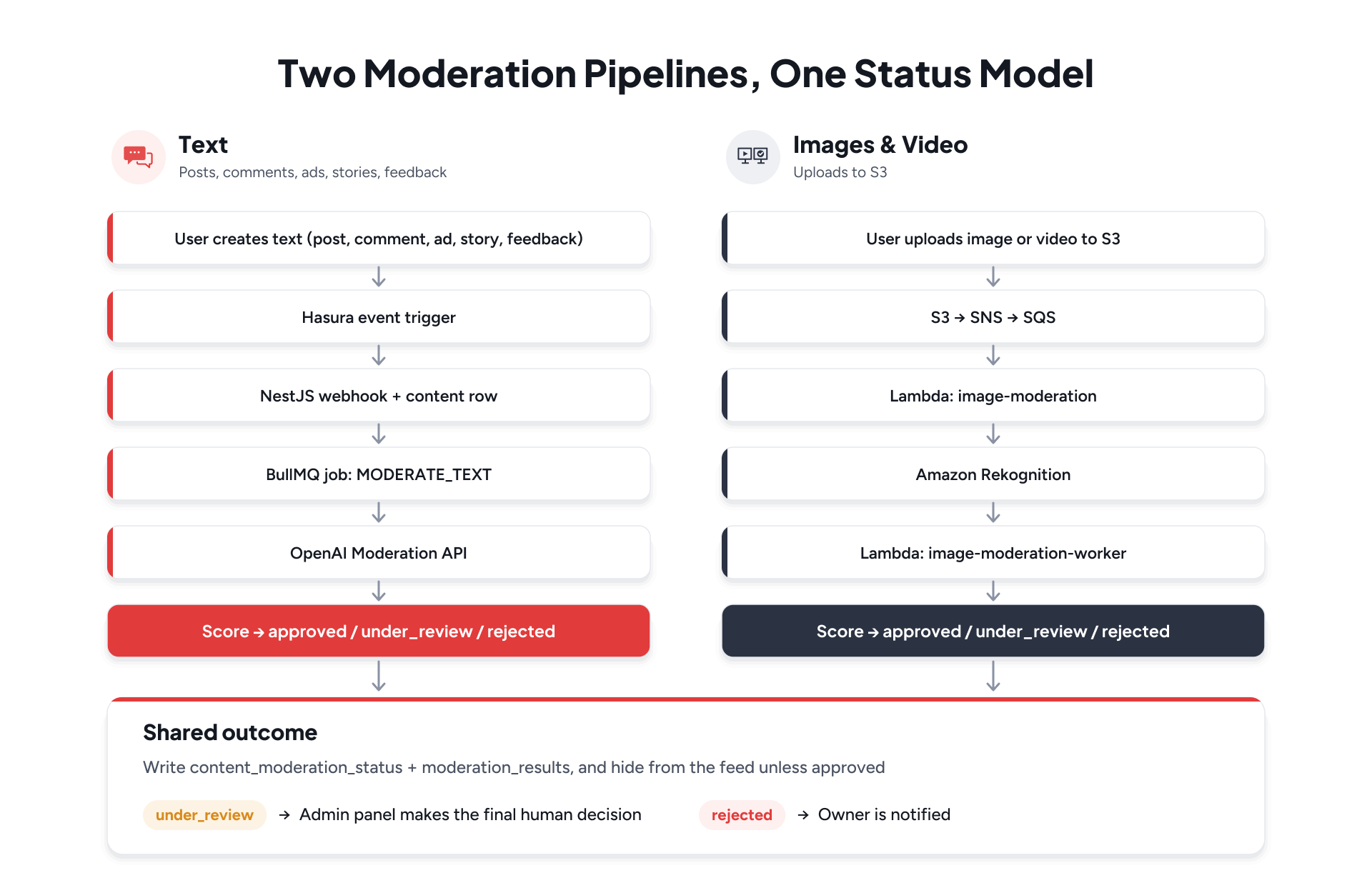
The design we shipped is deliberately split. Text goes through NestJS, Hasura event triggers, BullMQ, and the OpenAI Moderation API. Images and videos go through S3, SNS, SQS, AWS Lambda, and Amazon Rekognition. Both pipelines write the same status model, store the AI evidence, and leave gray-area content for the admin panel.
Moderation is not a feature bolted onto the feed. It is a gate the feed has to pass through.
Why Traditional Moderation Doesn't Scale
As content volume grows, moderation becomes less about identifying whether a single piece of content is safe and more about deciding where each piece should go.
Sending every piece of content to a human does not scale, while automatically approving or rejecting everything based on a single model score introduces its own risks.
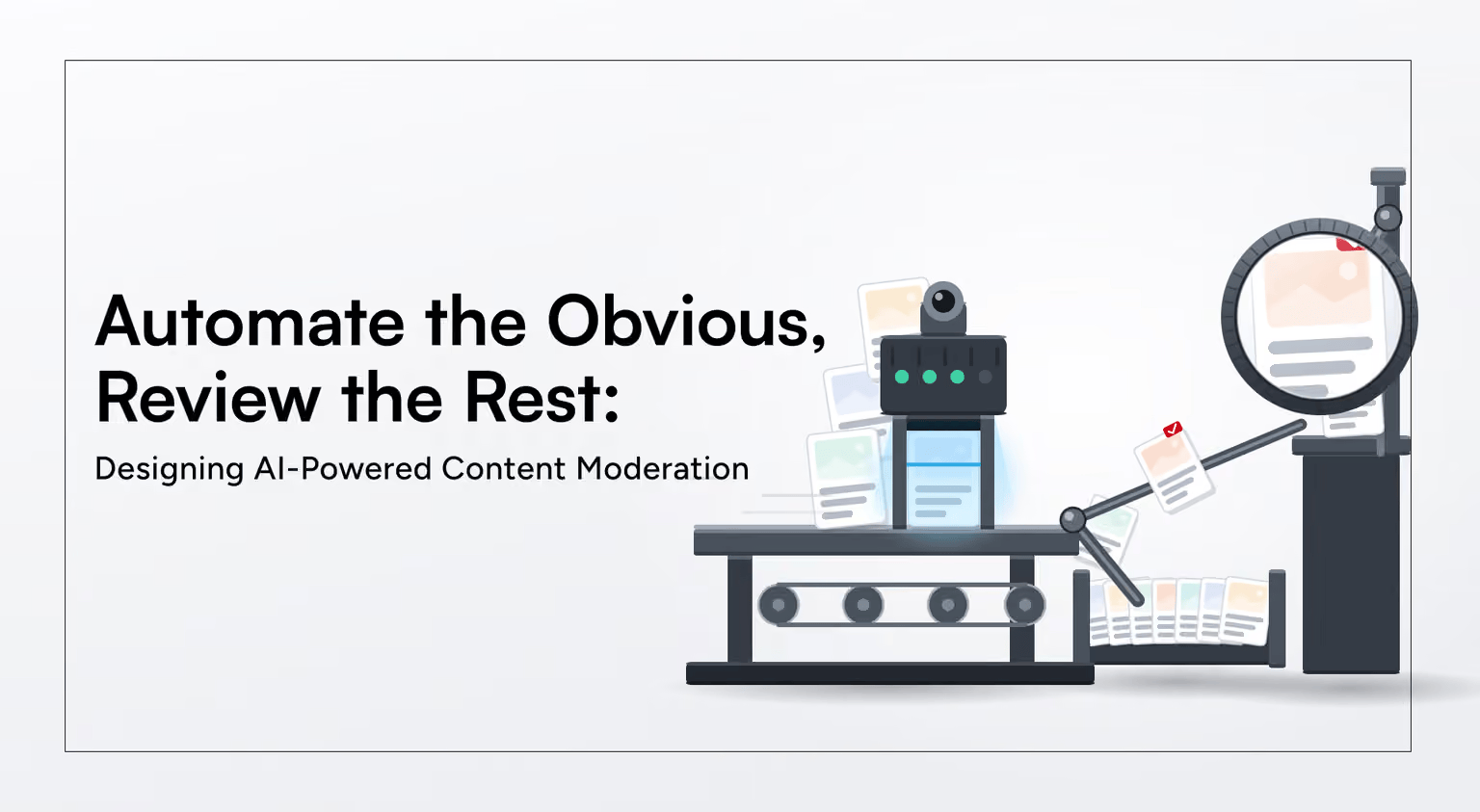
The system therefore treats moderation as a triage pipeline: clear cases are automated, ambiguous cases are escalated, and the feed only exposes content that has reached an approved state.
Why Content Moderation Is Required
User-generated content is the product. It is also a risk. Without a consistent review path, unsafe or policy-breaking material can reach other users in seconds.
- Protect people on the platform from explicit, violent, hateful, or otherwise harmful material.
- Keep posts, ads, and stories out of public feeds until they are safe to show.
- Meet App Store, Play Store, and trust-and-safety expectations for UGC products.
- Create an audit trail: what the model saw, what score it produced, and who made the final call.
- Notify the owner when content is rejected, instead of failing silently.
Manual review of every caption and every frame does not scale.A fully automated approve-or-reject model also creates risk: models are confident on extremes and uncertain in the middle. The system is built around that fact.
What the System Does
Every piece of moderated content starts as pending. Background work then produces a decision: approved, under_review, or rejected.
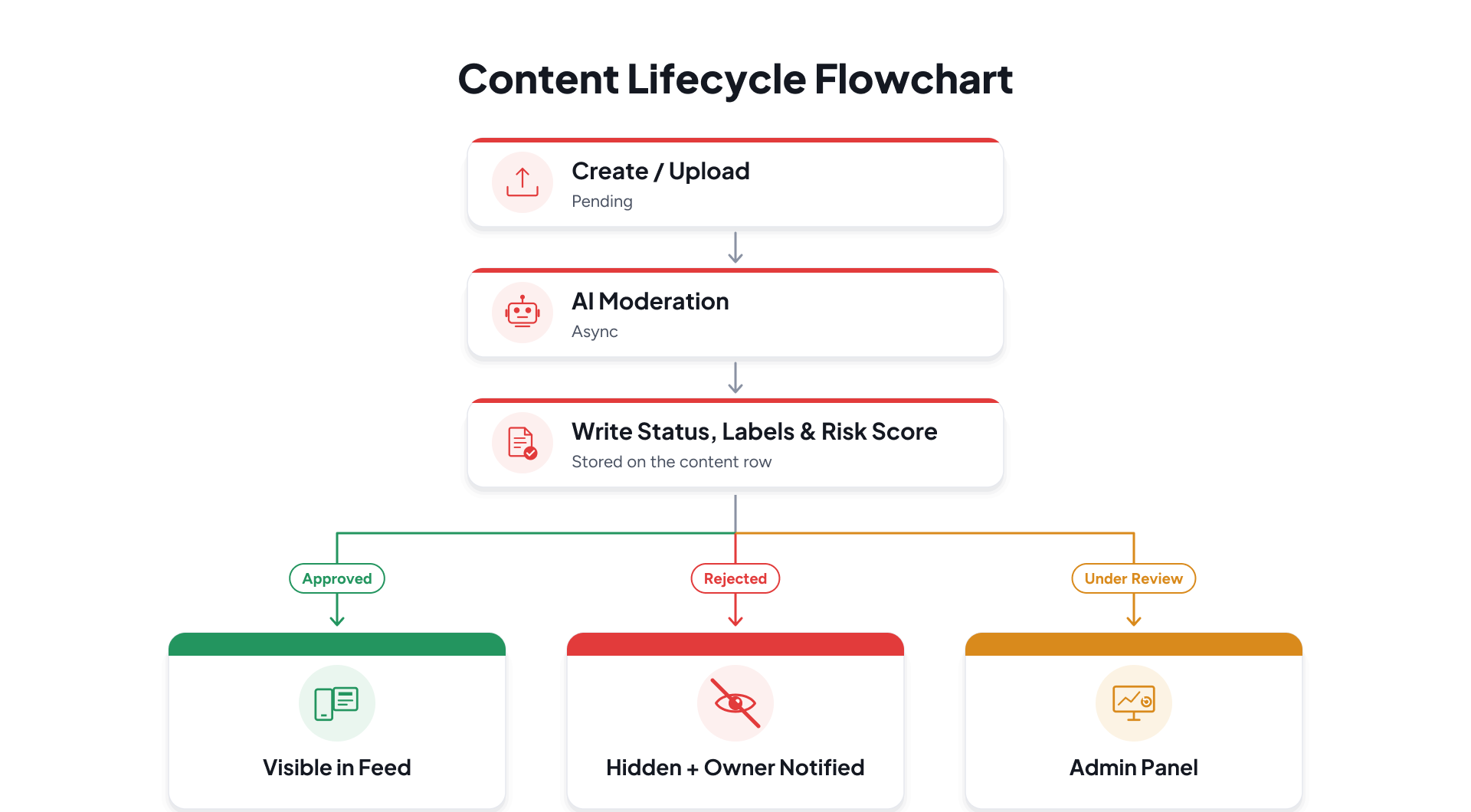
Approved content can appear in feeds and listings. Rejected content stays out of the public product. Under-review content stays out of the public product until a moderator confirms or overrides the AI decision. That is the contract.
The Architecture: Two Pipelines, One Status Model
We did not force text and media through the same worker. Text is small, frequent, and already in PostgreSQL at the moment it is written. Media is large, arrives in S3, and is expensive to inspect. Each path uses the infrastructure that fits it.
Shared data model
- content_moderation_status on the source row: pending, approved, under_review, rejected.
- A content row as the generic moderation record.
- moderation_results for provider, risk_score, labels, ai_decision, and final_decision.
- reviewed_by on the result row when a human takes the last step.
Feeds that list posts, ads, stories, or media filter on content_moderation_status = approved. The existing status columns (active, trash, uploaded, and so on) still mean what they always meant. Moderation is a separate lifecycle on purpose.
Do not overload "active" to mean "safe." Safety needs its own column.
Text Moderation: Hasura, BullMQ, and OpenAI
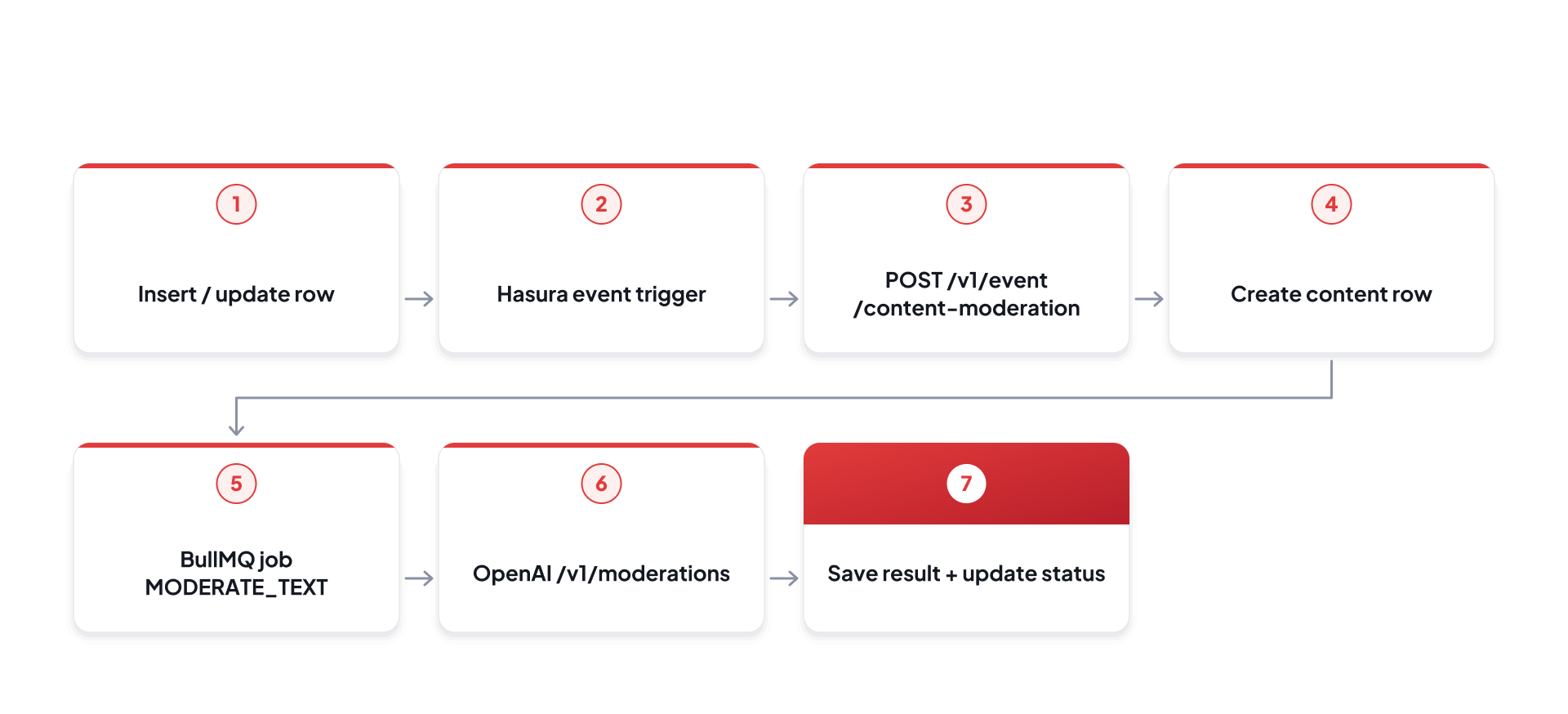
When a user writes text, the row is saved first. The HTTP request does not wait for OpenAI. Hasura fires an event; NestJS creates the content record and enqueues a job; a worker calls the model.
Text request path
The worker
The content-moderation processor runs with limited concurrency and a rate limit so OpenAI traffic stays controlled. Empty text is approved without a call.
Failed jobs go to a dead-letter queue. Hasura retries the webhook (three attempts, ten-second interval, sixty-second timeout) if Nest is briefly unavailable.
How Text Scores Are Calculated
OpenAI returns a flag plus a category_scores map, each value between 0 and 1. We do not treat the boolean flag as the decision. We convert the highest category score into a 0–100 risk score and classify from that number.
Text scoring
OpenAI category_scores
         ↓
Take the maximum score
         ↓
riskScore = round(max × 100)
         ↓
Compare to thresholds
         ↓
approved / under_review / rejected
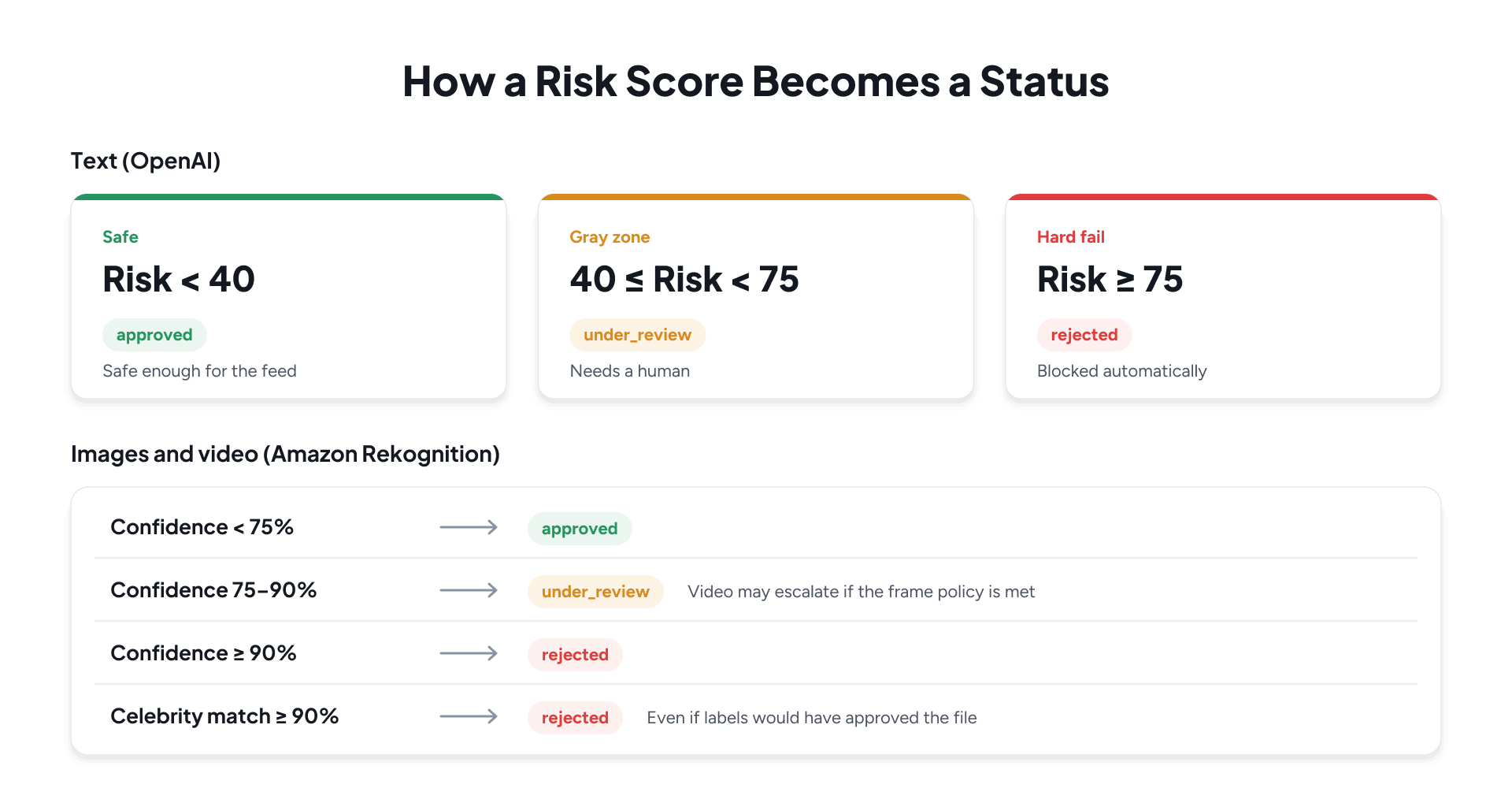
- Risk below 40 → approved. The content can enter the feed.
- Risk from 40 up to (but not including) 75 → under_review. A human must decide.
- Risk 75 or above → rejected. The content stays hidden and the owner is notified.
Only categories that meet or exceed the approved threshold are stored as labels, as percentages. The admin later sees the violated categories, not a wall of near-zero scores. Thresholds are configurable through MODERATION_APPROVED_THRESHOLD and MODERATION_REJECTED_THRESHOLD; the production defaults are 40 and 75.
How We Calibrated the Thresholds
Scores of 40, 75, or 90 only become production policy after you measure what those cutoffs do to false positives, false negatives, and human workload. The value of these thresholds comes from the calibration loop that produced and maintains them.
Starting points, not final answers
We began with provider semantics and product risk posture, then validated against labelled samples rather than shipping intuition.
- Text (OpenAI): start near the middle of the score distribution. Auto-approve only when the max category score is clearly low; auto-reject only when it is clearly high; leave a wide under_review band for the first weeks.
- Images/video (Rekognition): start stricter on auto-approve than text (review at 75%, reject at 90%), because a false approval in a feed is costlier than an extra item in the admin queue.
- Environment variables keep cutoffs changeable without rewriting the decision engine.
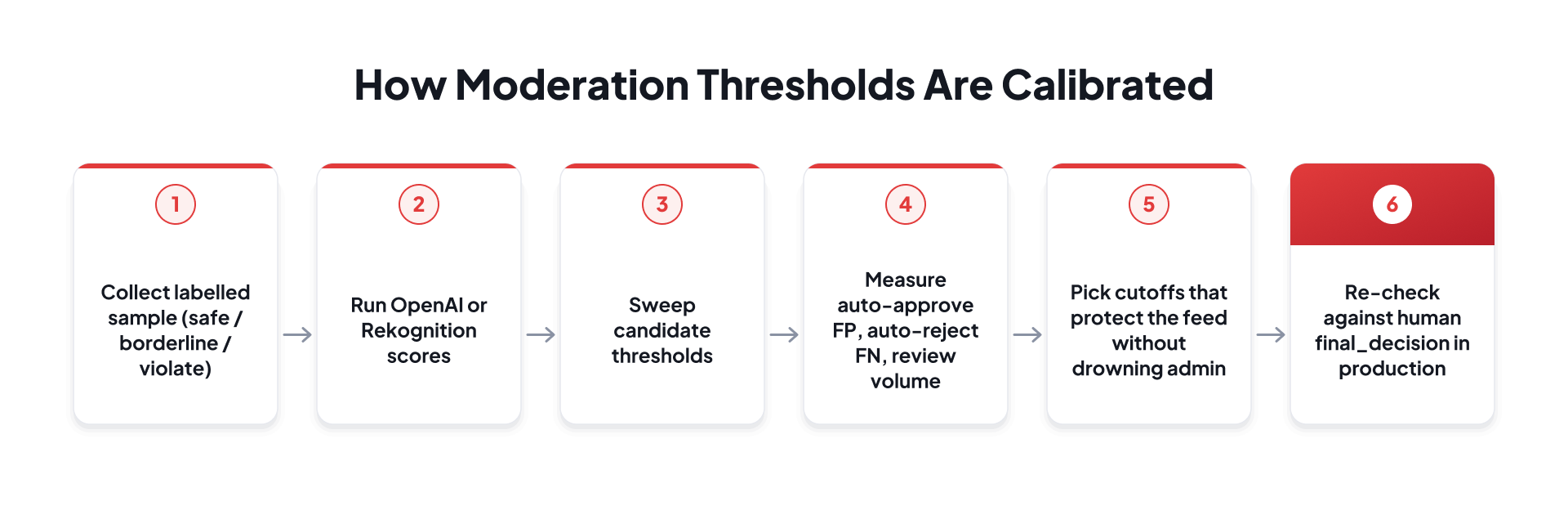
Labelled test set and threshold sweeps
Before locking production defaults, we built a small labelled set covering three buckets: clearly safe, borderline / ambiguous, and clearly violating. For each item we stored the model's raw scores, the would-be decision at candidate cutoffs, and a human gold label.
Calibration experiment
What "good" looked like for us
- Near-zero false auto-approves on the labelled violate set (missed harm is the expensive error).
- Bounded false auto-rejects: overturns in admin or appeals should stay rare; if many auto-rejects become approved, raise the reject line or widen review.
- A review band that is large enough to catch ambiguity but small enough that queue age stays within SLA.
- We treat the AI-human disagreement rate on under_review items as a first-class metric rather than noise.
Text settled at 40 / 75 after sweeps showed that scores below ~40 almost never carried human-confirmed violations in our sample, while scores at or above ~75 almost always did. The middle band produced the majority of human overrides, which is exactly where we want people in the loop.
Media settled at 75 / 90 based on the same calibration process but with a different cost curve: Rekognition confidences in the mid-70s were often ambiguous on a single frame, so we refuse to auto-approve there. Sustained or high-confidence hits (including the video frame policy) justify auto-reject without waiting for a moderator.
Thresholds are hypotheses. Production disagreement rates are the experiment.
We revisit cutoffs when operational signals move: rising appeals after auto-reject, reports against content that was auto-approved, or a review queue that ages past SLA. Calibration is continuous, not a one-time spreadsheet.
Image and Video Moderation: S3, Lambda, SQS, Rekognition
The media never waits in the Nest process for Rekognition. The user uploads to S3 under users/uploads/. An ObjectCreated notification is published to SNS, and the media path continues asynchronously.
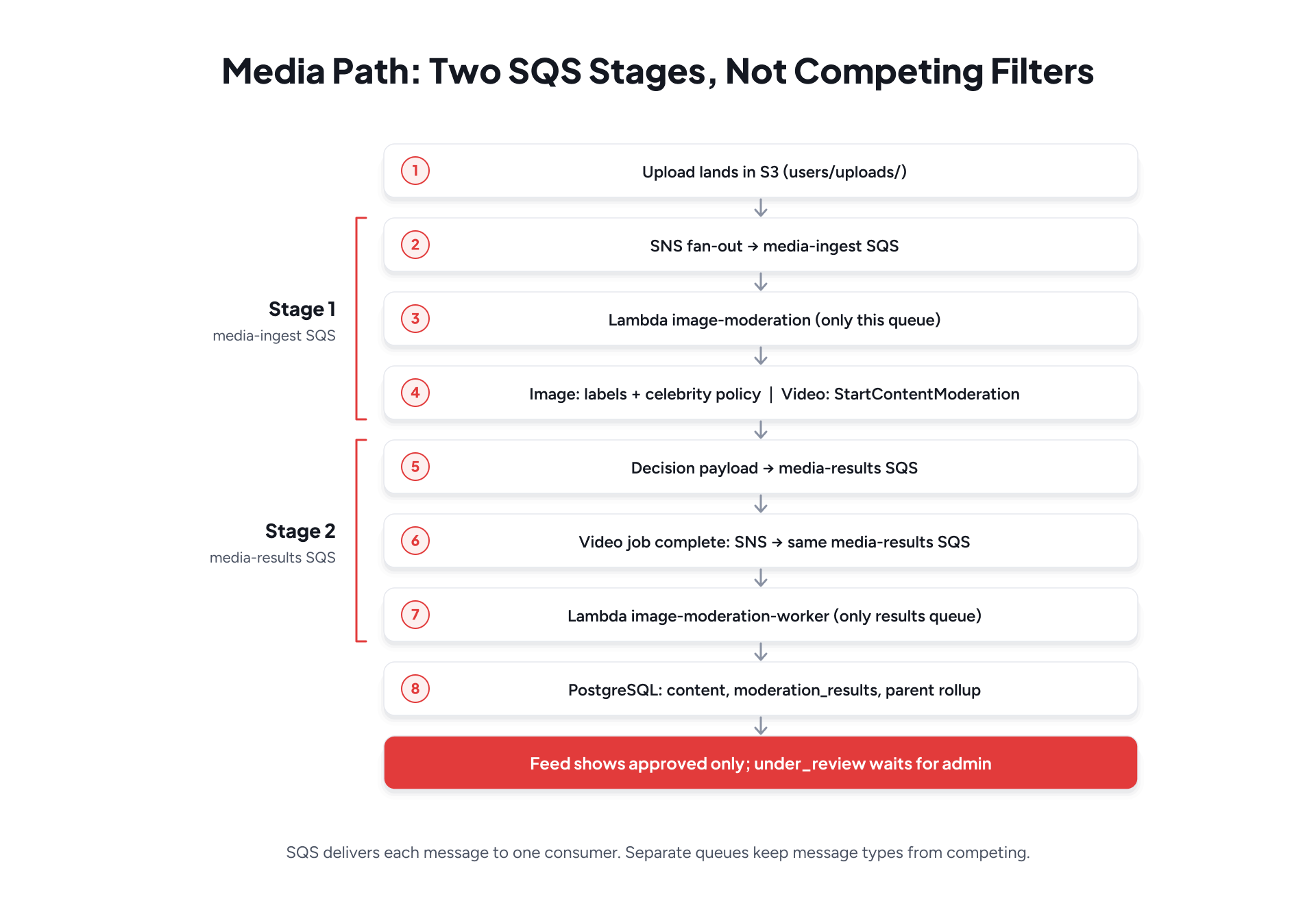
Why not two Lambdas on one SQS queue
SQS is a competing-consumer queue: each message is delivered to exactly one consumer. If two Lambda event-source mappings share a single queue and each "filters" by message shape, a message can land on the wrong function. That function may skip and still succeed—deleting the message—or fail and retry forever. Either way, delivery semantics are not safe for mixed payload types.
We therefore do not rely on two independently filtering consumers on one queue. The media pipeline is a two-stage design: an ingest queue owned by the scorer Lambda, and a results queue owned by the worker Lambda. SNS fans events into the correct stage; it is not used as a substitute for competing consumers.
What the first Lambda does
- Images (.jpg, .jpeg, .png, .bmp, .webp): DetectModerationLabels and RecognizeCelebrities, then evaluate thresholds and send a result message to SQS.
- Videos (.mp4, .mov): StartContentModeration with an SNS notification channel. Rekognition works asynchronously; the worker finishes the job later.
- Files matching a thumbnail filename or path pattern are still labeled because ad thumbnails can be the image users see first.
What the worker Lambda does
- Look up the media row by S3 key, retrying three times with a three-second delay so the upload API can finish inserting the row.
- Inserts content and moderation_results.
- Updates media.content_moderation_status.
- Propagates the worst status to the parent post, ad, or story.
- For videos, pages through GetContentModeration until every label is collected, then applies the frame policy.
SQS is the buffer. Lambda is the computer. Rekognition is the eyes. PostgreSQL is the record.
How Image Scores Are Calculated
Rekognition returns a list of moderation labels, each with a confidence from 0 to 100. We keep every label name mapped to a rounded confidence, then take the maximum confidence as the risk score.
Image scoring
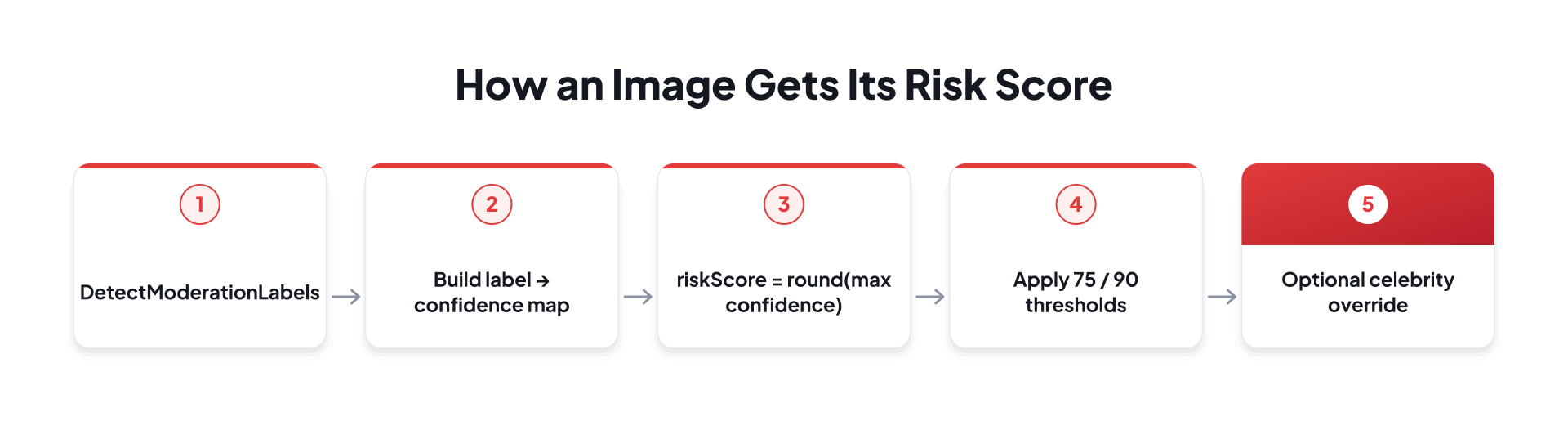
- Confidence below 75% → approved.
- Confidence from 75% up to 90% → under_review.
- Confidence 90% or above → rejected.
The defaults are MODERATION_REVIEW_THRESHOLD = 75 and MODERATION_REJECT_THRESHOLD = 90. They use a stricter review boundary than the text moderation thresholds because a false approval on a photo is more damaging in a feed than an unnecessary review. The policy also calls out hard categories Rekognition can surface—explicit material, sexual activity, violence, hate symbols, drugs and tobacco, visually disturbing content. High confidence in those labels is what the 90% reject line is designed to catch without a human delay.
Video: Async Jobs and Frame Policy
A video cannot be scored from a single still. Rekognition runs a content-moderation job across the file, publishes completion to SNS, and that notification arrives on the same SQS queue the image path already uses.
Video path
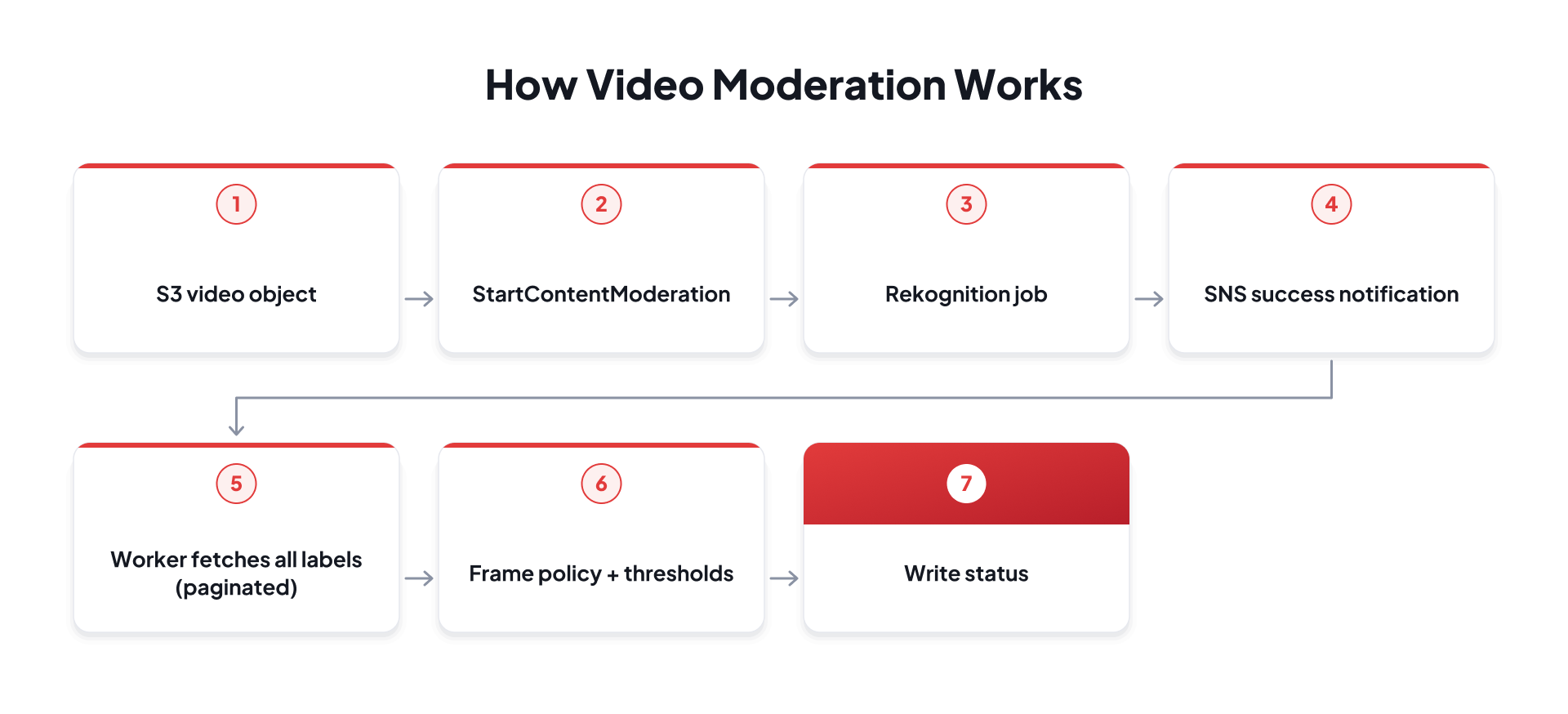
Each label is tied to a timestamp. We still compute riskScore as the maximum confidence, but the decision also depends on how often and how long the violation appears.
Frame policy
- A frame is violating if its label confidence is at least the review threshold (75%).
- Five or more violating frames, or a cluster lasting three seconds or more, meets the frame policy.
- If any label reaches the rejection threshold (90%+), the video is rejected.
- If labels are only in the review band and the frame policy is met, the video is also rejected—repeated mid-confidence hits are treated as a pattern, not a coincidence.
- If labels are only in the review band and the frame policy is not met, the video goes to under_review.
- No qualifying labels → approved.
One risky frame is a question. Five frames or three seconds is an answer.
Parent Aggregation and Feed Visibility
A post, ad, or story can have several media items plus text. The parent must not appear "approved" while one of its images is still pending or rejected.
Worst-status rollup
→ Media A approved → Media B under_review → Caption approved → Parent = under_review
Statuses are ordered pending < approved < under_review < rejected. The database function apply_aggregate_moderation_status applies that order to user_post, hey_ads, and users_story. If any child is rejected, the parent is rejected. List APIs for the product surface follow one rule: show content only when content_moderation_status is approved. Under-review and rejected items are not a client-side filter. They never qualify for the public listing query.
What Happens When Content Is Rejected
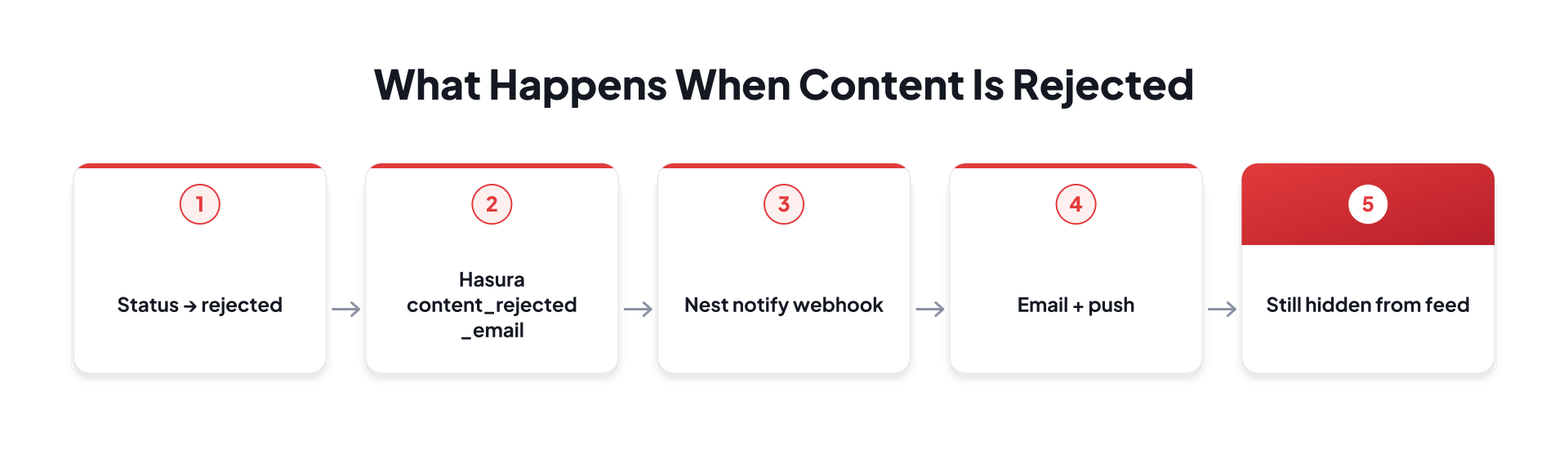
When content_moderation_status becomes rejected, a Hasura event on the content table calls POST /v1/event/content-rejected-notify. That queues an email through SendGrid and an in-app/push notification through Firebase, including the content type and rejection reason. The user is told the content did not pass review. They are not left guessing why it vanished.
Rejection side effects
The Last Step: Admin Panel Review
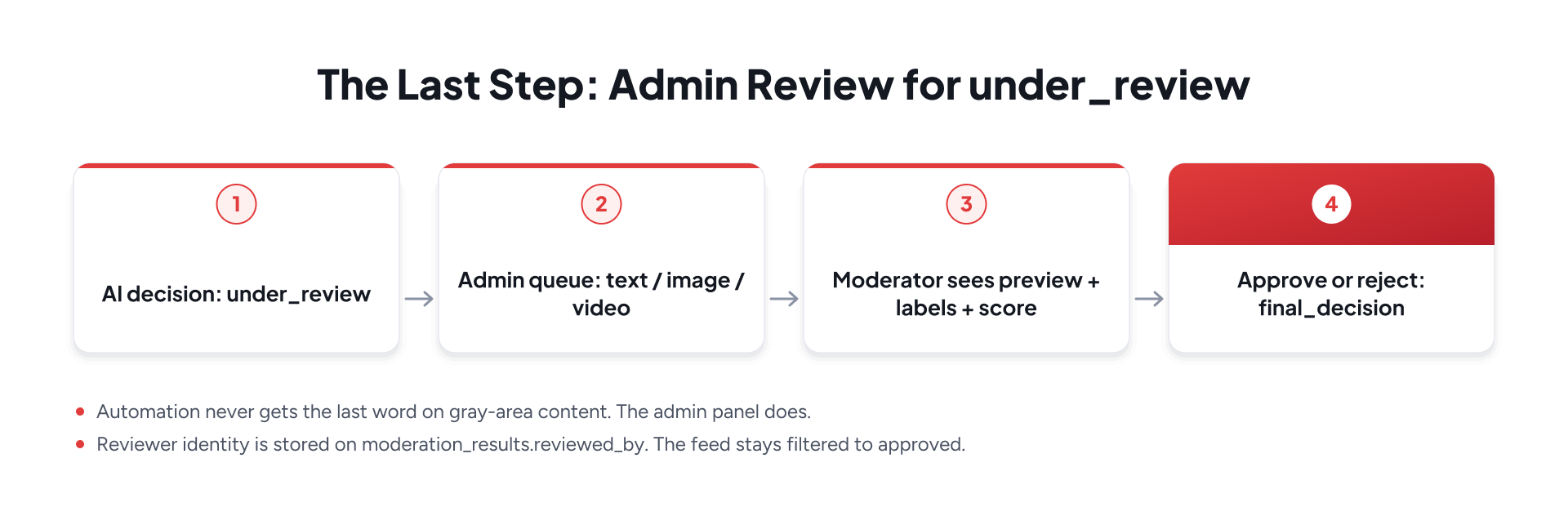
Automation is the first reviewer, not the last. Anything in under_review—text, image, or video—is a case a person has to close. That is the admin panel's job.
Human review path
What the moderator needs on screen
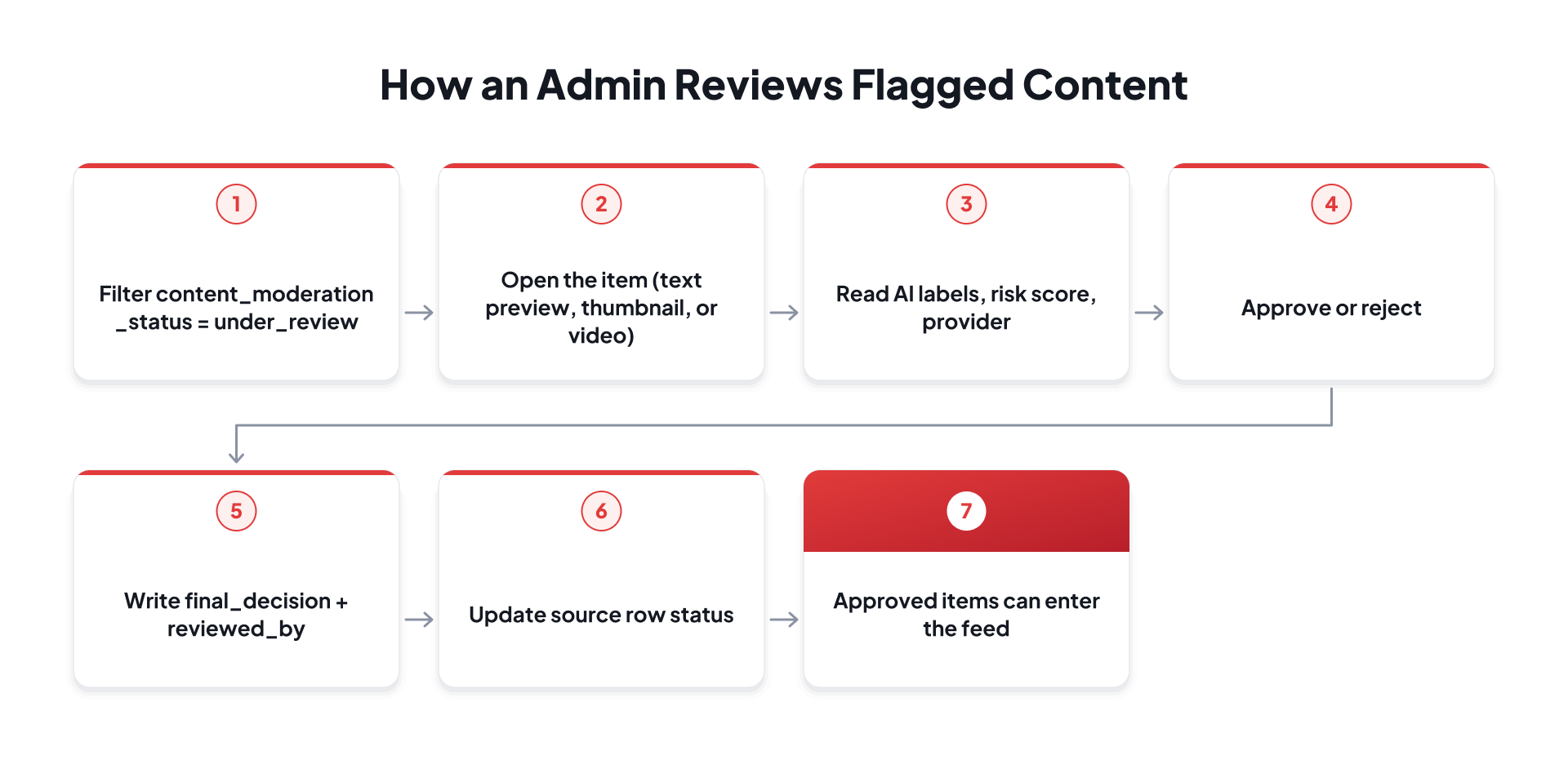
- A queue, not a scavenger hunt: one list of under_review (and optionally pending) items across posts, comments, ads, stories, and media.
- The source itself: caption text, image, or playable video.
- The machine evidence: provider (Openai or Rekognition), risk score, labels, celebrity names when present, video frame summary when present.
- Actions: approve, reject. Optionally escalate, assign, or add an internal note.
- Filters by content type, date, and score so a small team can work the riskiest items first.
On approval, both content_moderation_status and final_decision are set to approve. On rejection, the status becomes rejected, the existing rejection notification path fires, and the item still never reaches the feed. The AI decision remains on the row as ai_decision so we can measure how often humans agree with the model.
under_review is not a soft approve. It is a closed door until a person opens it.
The Production Feedback Loop
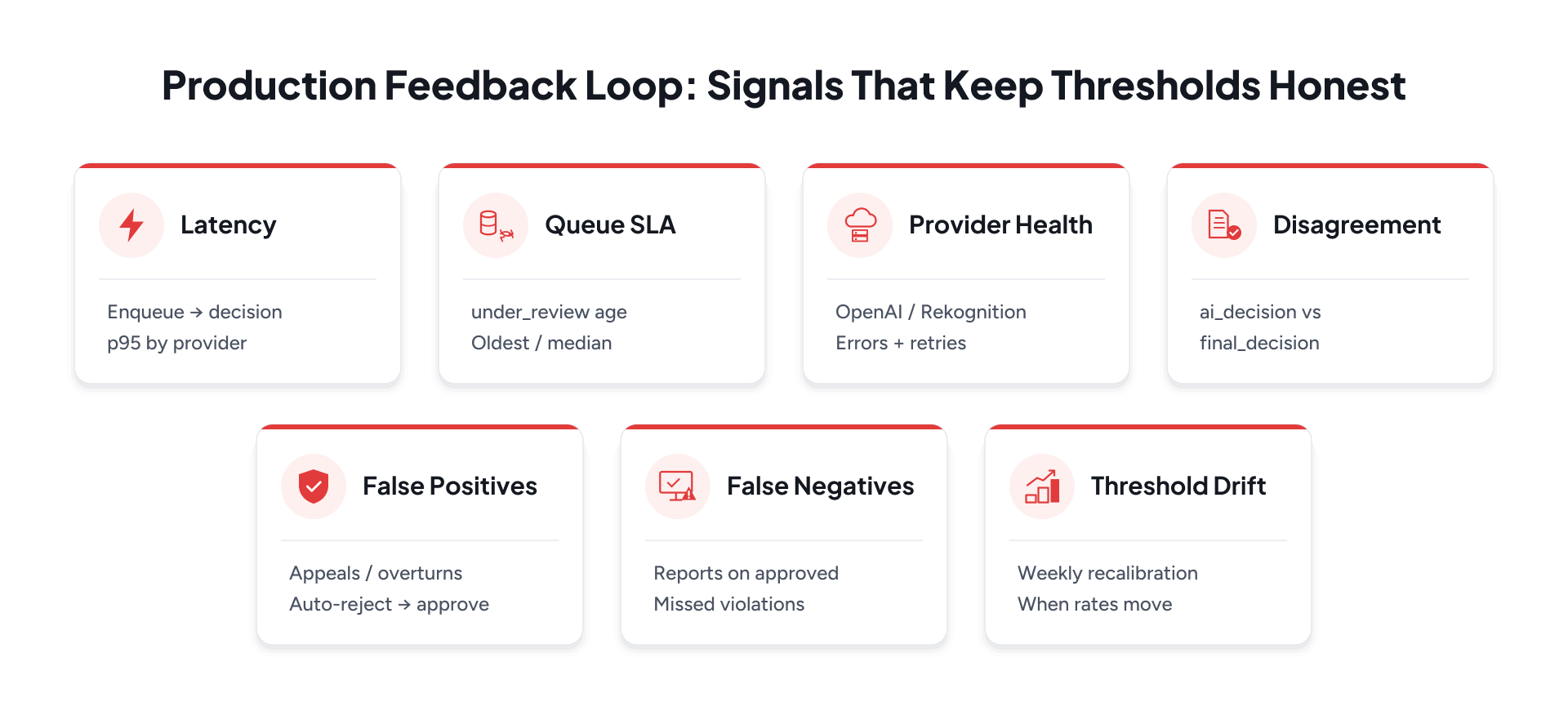
Shipping thresholds and queues is not the end of moderation work. The system has to be operated. We treat the following signals as the minimum set for running AI moderation in production—and as the inputs that decide when to retune cutoffs.
Operational signals
- Moderation latency: time from enqueue (Hasura event or S3 ObjectCreated) to written decision, tracked as p50/p95 separately for OpenAI text and Rekognition image/video.
- Review-queue age and SLA: count and age of under_review items; alert when the oldest item or median wait exceeds the team's SLA.
- Provider failures: OpenAI and Rekognition error rates, throttles, empty results, and dead-letter / retry volume on BullMQ and Lambda.
- AI–human disagreement rate: share of rows where ai_decision ≠ final_decision after admin review, broken down by provider and content type.
- False positives and appeals: auto-reject later overturned to approve; user appeals or support tickets after rejection notifications.
- False negatives and reports: user reports or admin discoveries on content that was auto-approved—these are the most expensive misses.
- Threshold drift: weekly or biweekly review of the above rates;if disagreement rates, appeals, or queue age move outside defined bands if disagreement, appeals, or queue age move outside bands, re-run the labelled sweep and adjust env thresholds.
Operate → measure → retune
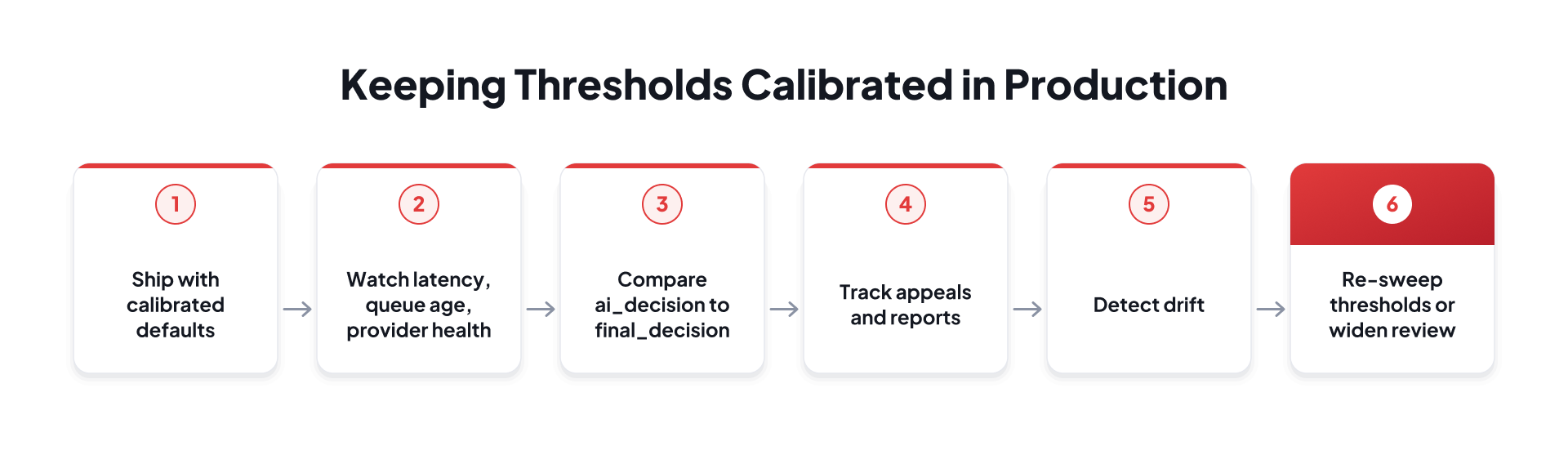
Storing ai_decision alongside final_decision and reviewed_by is what makes this loop possible. Without that pair, you can run a model, but you cannot prove whether the model and the product still agree.
A moderation system without operational signals is a deployment, not a practice.
The Deployment Pipeline
The media Lambdas are not updated by hand in the console as a normal workflow. Each function has a GitHub Actions workflow on the develop branch, scoped to its own directory.
Lambda CI/CD
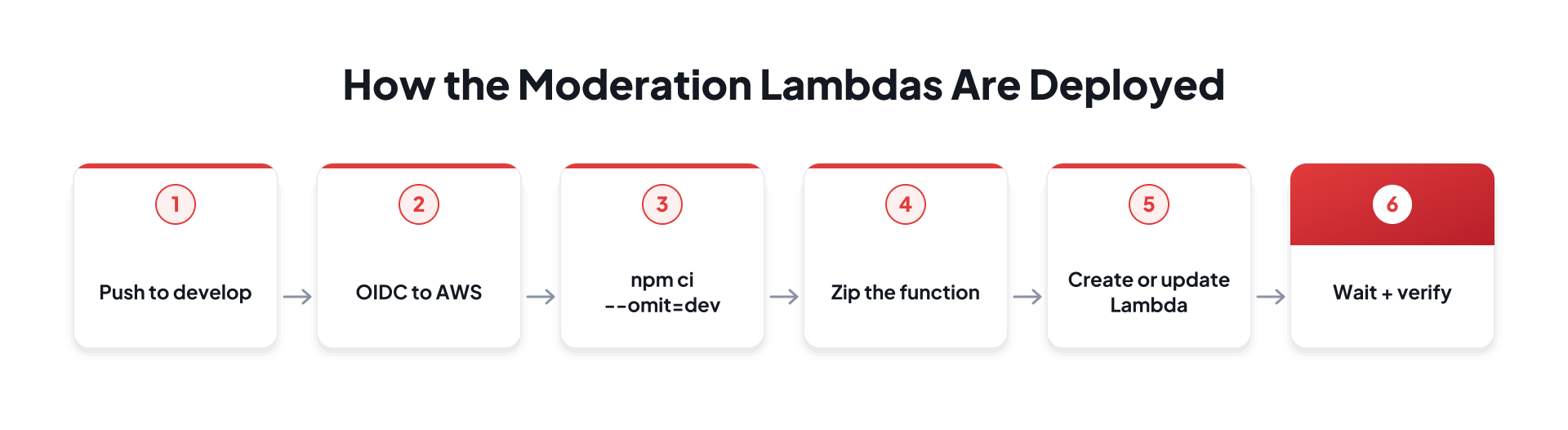
- deploy-image-moderation.yml watches lambda/image-moderation/**.
- deploy-image-moderation-worker.yml watches lambda/image-moderation-worker/**.
- Runtime is Node.js 22. The scorer Lambda is sized for a short Rekognition call (about 60 seconds, 256 MB). The worker is sized for video pagination and database work (about 5 minutes, 512 MB).
- Secrets stay in GitHub Secrets: queue URL, database connection, and deployment role. Thresholds and regions live in deploy config.
Text moderation ships with the NestJS service: the Hasura trigger metadata, the webhook, the BullMQ processor, and the OpenAI client. Changing a threshold is a configuration change, not a rewrite of the decision engine.
Edge Cases the Pipeline Had to Absorb
- Race with inserts: the worker retries media lookup because S3 can notify Lambda before Nest commits the media row.
- Ad thumbnails: if the object is a thumbnail rather than a media row, the worker can still attach the result to hey_ads.
- Unsupported types: unknown extensions are skipped rather than auto-approved by accident.
- Idempotency: if media is already moderated, a later result may only escalate to a worse status, never quietly downgrade it.
- Aggregation after the fact: parent status is recomputed from children so mixed media cannot hide a reject.
What This Changed in the Product
Outcome
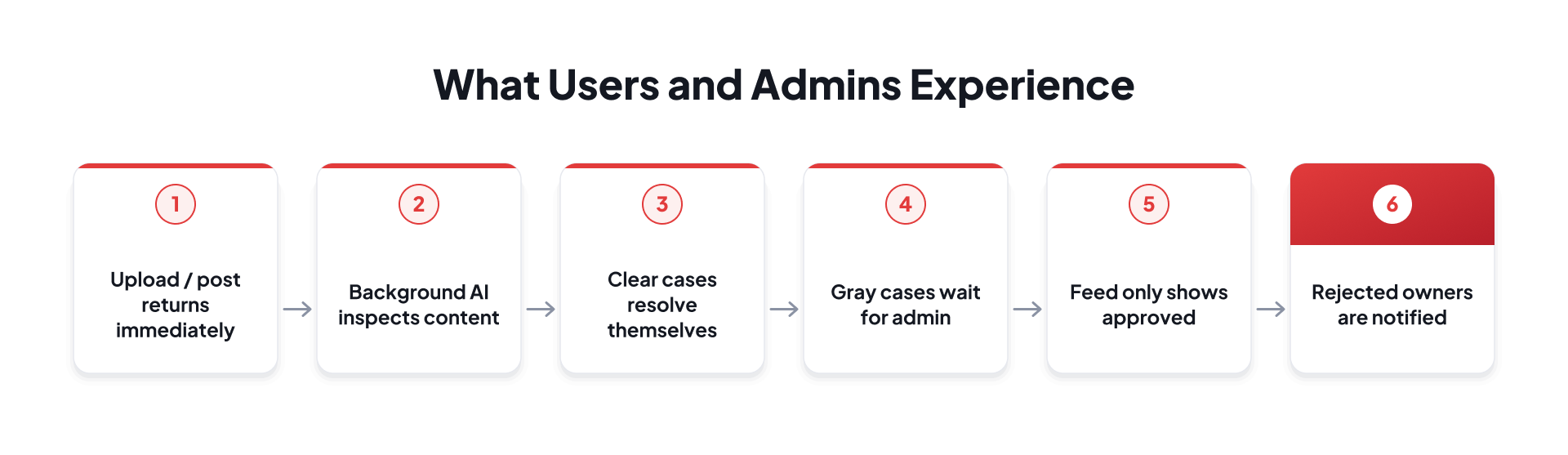
- Text, image, and video share one status vocabulary.
- OpenAI and Rekognition are isolated behind queues, so model latency is not user latency.
- Scores are explicit numbers with published thresholds, not hidden boolean flags.
- The admin panel is the last reviewer for under_review, not an optional extra screen.
- Evidence is stored: labels, scores, provider, and the human override.
The important change was not simply adding another moderation API. It was moving moderation from an isolated check into a product lifecycle. Content can return from the upload or post request without waiting for model inference, while remaining outside public listings until the moderation lifecycle resolves. Clear cases move automatically, uncertain cases reach the admin queue, and the final decision is recorded alongside the machine evidence.
This also creates a feedback loop: the AI decision remains stored alongside the human final decision, allowing the team to measure where automated decisions and human decisions agree or differ.
The Bigger Lesson: Automate the Extremes, Staff the Middle
A moderation system that only auto-rejects the obvious still leaks. A system that auto-approves anything the model did not scream about still leaks. The useful design is a three-way split.
The moderation mindset
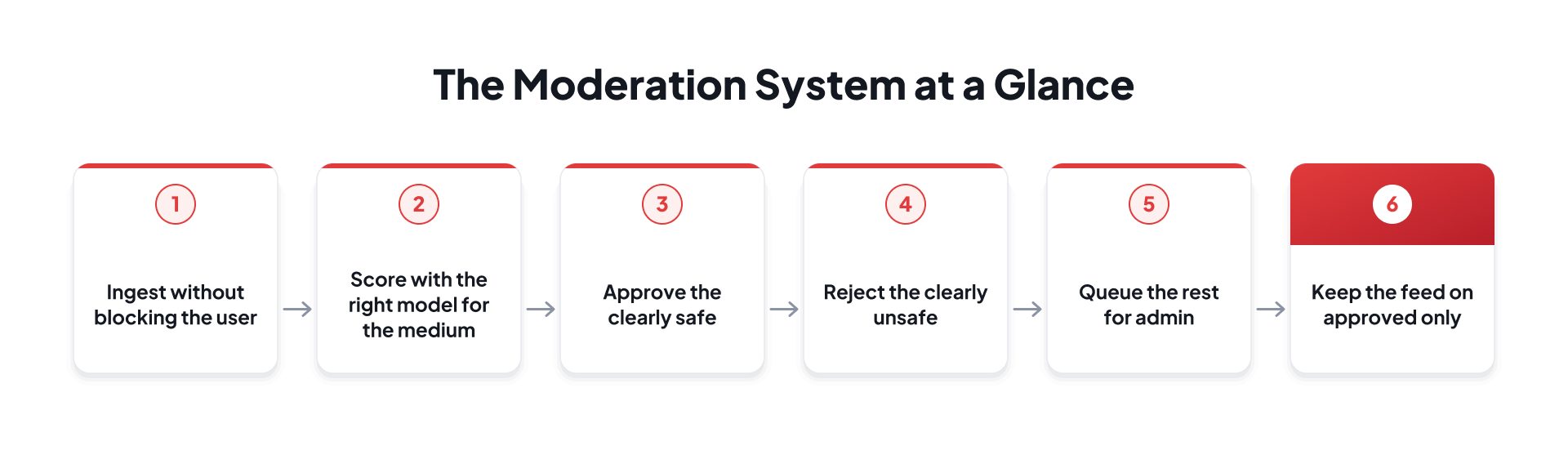
We used OpenAI for language because it already classifies the categories we care about in text. We used Rekognition for pixels because it already understands moderation labels, video timestamps, and celebrity faces. We used Lambda and SQS because media events are bursty and should not live inside the API process. We used Hasura and BullMQ because text events are already database events. We used an admin queue because a score of 62 is not a moral fact. It is a request for a person.
The goal of AI moderation is not to remove humans from the loop. It is to make sure humans spend their time where human judgment matters most.
So before a caption, a photo, or a video is allowed to represent the product, it has to survive the pipeline: pending, scored, decided, and—if the model is unsure—reviewed. That is how content moderation works here: as a path every piece of user content has to follow before it hits the feed, rather than as a slogan in a policy document.
What's Next? Engineer AI Moderation for Production
The bigger lesson goes beyond content moderation. Production AI features need more than an accurate model. They need clear decision boundaries, asynchronous processing, human review paths, auditability, monitoring, and a way to improve as real-world behavior changes.
The same principle applies whether AI is moderating content, evaluating documents, prioritizing cases, or assisting users inside a product. Automate decisions where confidence is high, route ambiguous cases to people, and retain enough evidence to understand why each decision was made.
That is what turns an AI capability into a system a product team can operate at scale.
At GeekyAnts, our AI Engineering teams design and build production-ready AI systems around real product workflows, combining model integration with scalable architecture, observability, deployment, and human-in-the-loop controls.
Building an AI-powered feature that needs to move from model API to production system? Talk to our AI engineering team.
Comments
Join the discussionNo comments yet. Be the first to comment.