A Guide To Duplicity: Part 2
A guide to backing up and restoring data on a new server by implementing an My SQL integration
Hi, I’m Aditya Prakash, a Senior DevOps Engineer II at GeekyAnts India Pvt. Ltd. With over three years of experience in DevOps and cloud solutions, I specialize in designing, implementing, and optimizing cloud infrastructure. My expertise spans multiple Cloud Service Providers, including AWS, Azure, GCP, and DigitalOcean.
I hold certifications as an AWS Certified Developer Associate and Microsoft Azure Certified Developer Associate, which reflect my deep understanding of cloud technologies. My passion lies in solving complex technical challenges and bridging the gap between development and operations, with a strong focus on building efficient systems and automating workflows.
With hands-on experience in managing and automating the entire DevOps lifecycle, I am skilled in configuration management, CI/CD pipelines, and Infrastructure as Code (IaC). I continuously strive to improve cloud-based deployments, ensuring they are scalable, reliable, and optimized for performance. I am always exploring new technologies and sharing insights with the community to drive innovation and best practices in the DevOps space.
What is database backup?
Database backup is the process of backing up the operational state, architecture and stored data of a database software through database replication. It can be done for both databases and database servers, making it highly advantageous for organizations to store data.
Why is it required?
Database backup is performed to ensure a company’s compliance with business and government regulations as well as to maintain and ensure access to critical/essential business data in case of a disaster, technical outage or even a breech.
The database is the core of any application's data management and a place where all or maybe most of the data is stored. Database administrators can use this database backup copy to restore the database to its operational state along with its data and logs and hence prevent any loss of important information. The information obtained from a database backup can be stored locally or on a backup server.
Duplicity
Duplicity is a server backup and restoration tool which implements a traditional backup scheme where the initial archive contains the information (full backup) and only the changed information is added going ahead.
It is a free, open-source and advanced command-line backup utility tool which is built on top of librsyncand GnuPG. It produces digitally signed, versioned and encrypted tar volumes for storage on a local or remote computer. Duplicity supports many protocols for connecting to a file server including ssh/scp, rsync, ftp, DropBox, Amazon S3, Google Docs, Google Drive etc.
Here is the link to the official docs for your reference.
About this article
In this article we basically discuss two aspects:
- Using Duplicity for database backup.
- Restoring stored data onto a new server.
You can refer to my previous article on Duplicity to get started with the tool.
For this article, I have used three CentOS servers one of which will be a database production server, a backup server and a third server where the restoration of data can take place. (DB-prod, DB-backup and New-Restore Server). We will be using MySQL as the database here.
So let's go ahead and explore the tool
Using Duplicity for database backup
Install duplicity
- For the installation of Duplicity, run the following code on the
DB-prodserver:
yum install epel-release
yum install duplicity
duplicity --version
- This snippet only needs to be installed on the prod server and not on the backup server. Here is the link to the other installation guides
Establish a connection between servers
- Create a
sshkey on the prod server and add.ssh/id_rsa.pubto the *ssh/authorized_keysof the backup server to establish a securesshconnection. Use the following code snippet to proceed:
ssh-keygen -t rsa -m PEM
Setup for encryption
Duplicity can use GnuPG(GNU Privacy Guard) which allows you to encrypt and sign your data and communications; it features a versatile key management system along with access modules for all kinds of public key directories. GnuPG, also known as GPG, is a command line tool with features for easy integration with other applications.
Use the following snippet to create
gpgkeys:gpg2 --full-gen-keyYou can also go ahead with the default value of the prompts. You will also be setting a
PASSPHRASEat this stage for future usage.
List the required keys using the following code snippet:
gpg --list-keysWe will be using these keys for encryption and decryption. Here is a pictorial representation of the keys:

MySQL installation on the three servers
- Install and configure MariaDB to proceed. It is fairly simple to install and set up. We can install the
dnfkey on CentOS using the following snippet:
dnf install mysql-server
systemctl start mysqld.service
systemctl status mysqld
systemctl enable mysqld
mysql_secure_installation
Create MySQL dumps
Create a MySQL backup folder to store the MySQL dumps on the same machine. In Mysql, the best way to create the dumps of databases and restore databases from the dumps whenever required is to create this folder.
The mysqldump client utility tool which is provided performs logical backups which produces a set of SQL statements that can be executed to reproduce the original database object definitions and table data.
- In this example, let us consider that we have a
testDBwith an authors table inside of it. Enter the following code snippet to continue:
mysql -u root -p
CREATE DATABASE testDB;
use testDB;
CREATE TABLE authors ( id INT, name VARCHAR(20), email VARCHAR(20));
INSERT INTO authors (id,name,email) VALUES(1,"Aditya","aditya@xyz.com");
INSERT INTO authors (id,name,email) VALUES(2,"Prakash","prakash@xyz.com");
INSERT INTO authors (id,name,email) VALUES(3,"nihal","nihal@yahoo.com");
- Use the following code snippet to create the dump:
cd mysql-backup/
mysqldump -u root -p testDB authors > authors.sql
Create backup
- We can create a backup of the entire
mysql-backupdirectory using the following snippet:
PASSPHRASE='<passphrase>' duplicity --encrypt-key <encrypt-key> mysql-backup sftp://root@<db-backup_server>://root/remoteBackup/db-prod/dbbackup
- Here, we will define the source of the directory that needs to be backed up(
mysql-backup) along with the encryption and destination server and folder(<db-backup_server>://root/remoteBackup/db-prod/dbbackup) which will create a full backup for you.
Note: Any subsequent running of this command will lead to the creation of incremental faster backups.
- To list the backed-up content on the
DB-prodserver, run the following command:PASSPHRASE='<passphrase>' duplicity list-current-files --encrypt-key <encrypt-key> sftp://root@<db-backup server>://remoteBackup/db-prod/dbbackup
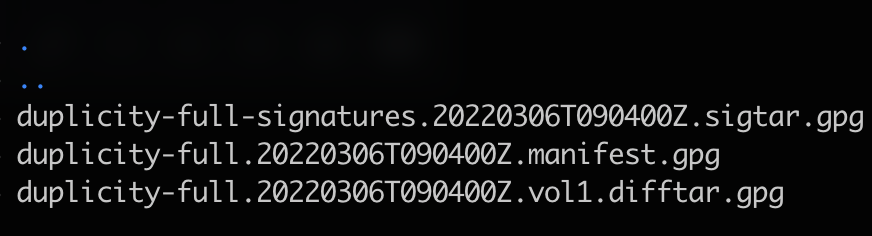
- If we list the content of the destination folder on the backup server which is
/root/test/home, we will find that the data which is stored/backed up has been encrypted with anls -laelement. Refer to the image below:
Unlike first article of this series, we will try to restore the backed-up content on a new server. But for that, we will need the same
gpgkeys on the new server so that it can decrypt the data that it pulls from the backup server.
Restoring Duplicity-stored data onto a new server.
Export the gpg keys of DB-prod to DB-backup
Use the following code snippet to store
gpgkeys in a file:gpg --export-secret-keys > private.keyFill in the
PASSPHRASEwhen prompted to proceed with the restoration of data and transfer it to the backup server using theSCPelement and the following code snippet:scp private.key root@<db-backup_server>:/root/gpg_key_store/db-prodFollow the earlier mentioned steps to install Duplicity along with a secure
-sshconnection which has been established between the new restore server and theDB-backupserver.
- Import the
private.keyon the new restore server fromDB-backupserver and fill in thePASSPHRASEwhen prompted. Use the following code snippet to proceed:
scp root@<db-backup_server>:/root/gpg_key_store/db-prod/private.key private.key
gpg --import private.key
Restore the data
Restore data from the backup server to a required destination. Duplicity is smart enough to recognize that first parameter is the source and the second is the destination. Enter the following snippet into your console to proceed:
PASSPHRASE='<passphrase>' duplicity --encrypt-key <encrypt-key> sftp://root@<db-backup_server>://root/remoteBackup/db-prod/dbbackup <reqd_destination>Run the following MySQL commands to go ahead with the restoration process:
mysql -u root -p
CREATE DATABASE testDBnew;
- Then, run the following command on the terminal:
mysql -u root -p testDBnew < <path to dump>.sql
- The major advantage of using Duplicity as the tool for the database backup is that the backed up data is encrypted unlike any other popular systems like
mysql-replication.
Conclusion
With Duplicity you can backup important files to a local drive or SFTP server, and restore them with ease. Duplicity is not just a backup solution; it allows you to keep a full history of file versions in your backup location and restore any version, at any time. After going through both my articles on Duplicity, you can now backup any data from any location with it being encrypted and easily restorable.
Hope you liked this article.